
The 39 Best Productivity Apps (by Category)
These are the apps we recommend for building a complete productivity stack – for iOS, Android, Mac & Windows

Let’s get one thing out of the way first: You do not need any of the apps on this list in order to be productive.
Michaelangelo painted the Sistine Chapel without a Pomodoro timer. Marie Curie managed to develop her theory of radioactivity without a note-taking app. Benjamin Franklin kept track of his to-do lists quite well enough with pen and paper. People have been accomplishing great things for millennia without any digital assistance.
What’s more important than the apps you use are the habits and systems you put in place to show up consistently and do the work.
That said, the right apps, used intentionally, can make setting up and maintaining those habits and systems much easier and more convenient (in addition to speeding up or automating away the repetitive things you do every day).
We’ve pulled together a list of apps we recommend for building a comprehensive productivity stack in the coming year across whatever devices and platforms you use – Windows, macOS, iOS, or Android. Read the whole app guide from start to finish or use the table of contents below to jump right to the app categories that are most interesting to you.
A few caveats on how we chose the apps we recommend
How we define "productivity." We think most "best productivity apps" lists are too narrow in focus. At Todoist, we take a much more expansive view of what productivity means. It’s not just about doing more things in less time (though that’s an important part of it), but about living the life you want to live, whatever that looks like for you. Our list includes the traditional productivity categories like task management, time tracking, and note-taking, but also broadens the lens a bit to include apps for things like better sleep, learning, and collaboration.
The apps we actually use every day. We’re a fully remote team of about 100 people who build productivity apps for a living. We spend a lot of time on our devices and a lot of brainpower thinking about how to work more efficiently. The following are all apps that people on our team actually use on a daily basis to stay organized and productive. We’re not getting anything from these companies in return for including them on the list (though in the interest of full disclosure, we are the makers of Todoist, our recommendation for task management, and Twist, our recommendation for team communication.) We recommend them because they’ve made our lives easier in some way, and we think they’ll help you too.
Cross-platform. We prioritized apps that don't lock you into a single ecosystem and can be used cross-platform – on iOS, Android, Mac, Windows, and often browser extensions too. Where we couldn't find a great app that operates across ecosystems, we've included alternatives for each platform. Long story short, you'll get value from this guide no matter what kind of phone or computer you use.
Only the best. Unless fine-tuning your productivity stack is your idea of fun, we think your time is better spent actually getting things done. That’s why, unlike a lot of other “best productivity apps” lists, we’re not going to give you nine different options for time tracking apps or twelve alternatives for calendars. We’ve done all the leg work for you and recommend only the best options based on our own experience. Of course, there are a lot of great apps out there and this guide can’t cover all of them. Inevitably, some of our recommendations may not be the best option for you, but we think that they’re the best for most people and “good enough” for everyone.
The best isn’t always free. If you're looking for a list of free apps, this isn't it. While many of the apps on this list are free (or have free versions that give you most of the functionality you'll need), others have key features locked behind a paywall. Rather than opting for only free software, we tried to balance price with quality and recommended the apps we believe are the best value. We've included the price for each app so you can make the best decision possible.
Time tracking apps
Time tracking can feel a lot like budgeting or calorie counting, a joyless pain in the butt. But in the end, the way we spend our time day-to-day is how we spend our lives. Knowing where your time is currently going and setting goals for where you want it to go can be both eye-opening and motivating. We recommend adding the following two apps to make time-tracking less of a chore.
1. RescueTime – For automatic time tracking
For iOS, Android, macOS, Windows, Linux, & Chrome OS; Browser extensions for Firefox, Chrome, & Brave
RescueTime is the time tracking app for people who hate time tracking. It provides a treasure trove of personal insights without you ever having to start or stop a timer.
RescueTime runs in the background on your computer or phone and automatically tracks which apps and websites you use and how much time you spend on them. You can customize which activities you consider "productive" and "unproductive" and get a weekly email summary of your time use as well as real-time alerts if you go over your goals in a particular app or website.
You can even block certain sites altogether to stay focused and have the app tell you if you're doing too much work outside of work hours.

(If you're worried about giving an app that much access to your data, you can read up on their privacy policy. They state upfront that your individual data will never be shared.)
Pricing: The lite version is free to use and includes limited project tracking and report experts. Premium ($12/month) comes with unlimited history and features like focus time distraction blocking, offline time tracking, real-time alerts, custom work hours, and more.
2. Toggl Track – For manual time tracking, especially if you work with clients
For the web, Mac, Windows, Linux, iOS & Android; Browser extensions for Chrome, Firefox & Edge
Sometimes automated time tracking can't tell you everything. For example, some time spent on X can be considered productive and some time just isn't. Only you know the difference.
Toggl Track makes it easy to track your time based on your own categories to provide deeper insights into your productivity. For example, Todoist's integrations developer Willian uses the categories "Deep Work" and "Shallow Work" to make sure he's spending enough time on the work that is most impactful.
If you work with clients, the app gives you an accurate record of how much time you spent on which projects with detailed reports and dashboards. You can even assign a billable rate to each type of task you do.

While Toggl Track isn't automatic like RescueTime, it does make it as easy as possible to start a timer and categorize the tasks you work on so you know exactly where each minute goes. They have desktop and mobile and plugins for browsers plus integrations with hundreds of other apps (including Todoist!) so you can start and stop your timer anywhere.
Toggl can be useful for anyone who wants more detailed insights into how they spend their time, but if you do client work it's a must-have for your productivity stack.
Pricing: Toggl’s basic time tracking features are free to use. The starter plan ($9/user/month billed annually) adds features like billable rates and project templates. The premium plan ($18/user/month billed annually) adds even more features for helping a team stay on top of their time tracking. Toggl Track also has an enterprise plan (custom pricing) for large organizations that need multiple workspaces.
Task management apps
The centerpiece of any productivity stack is a task management app that makes it easy to get tasks out of your head and organized in a way that makes it clear what you should be working on when. Here are the apps we recommend:
3. Todoist – For keeping your tasks & projects organized
For the web, iOS, Android, Mac & Windows; Browser extension for Chrome, Firefox, Opera & Safari
We make Todoist, so we may be biased. But both Wirecutter and PC Mag agree that it’s the best to-do list app out there right now. Here’s how Wirecutter describes Todoist, which it refers to as the best to-do list app for most people:
“Todoist is one of the best-known to-do list apps, and for good reason—it’s simply a joy to use, with a treasure trove of helpful functions, such as progress tracking, unlimited reminders, and organizational features that make managing multiple projects a breeze, including color coding and 150 filter views.”
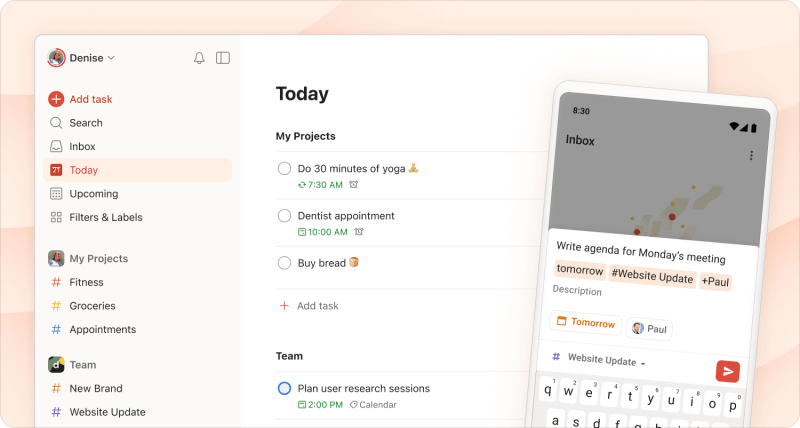
Todoist is simple to use, but has a lot of advanced organizational features that power users love, like a calendar layout, custom filters and labels, project sections and sub-tasks, project sharing and collaboration, and integrations with apps like Google Calendar and smart assistants like Siri. We’re also committed to being truly cross-platform with apps for iOS, Android, Mac, and Windows and plug-ins for Chrome, Firefox, Safari, Gmail, and Outlook.
Pricing:Free, but the premium version ($4/month billed annually) will give you access to extra features like advanced reminders, a calendar layout, task comments and file uploads, project templates, calendar feeds, and more. A business version ($6/user/month billed annually) will give you an additional admin panel to manage team members, team billing, a team inbox, and increased project limits.
4. Taskade - For AI-powered workflows and automations
For iOS, Android, Mac, Windows & Linux, plus browser extensions for Chrome, Edge & Firefox
Have you ever wished you had a few extra coworkers to help you plan your projects and tackle your workload? Taskade is a task management app with built-in AI agents that help you get more done in less time.
With Taskade, you can create project workflows for your team, set up AI-powered automations, and connect all your tools and documents. You can also build AI agents that autonomously oversee workflows, research topics, and complete tasks.
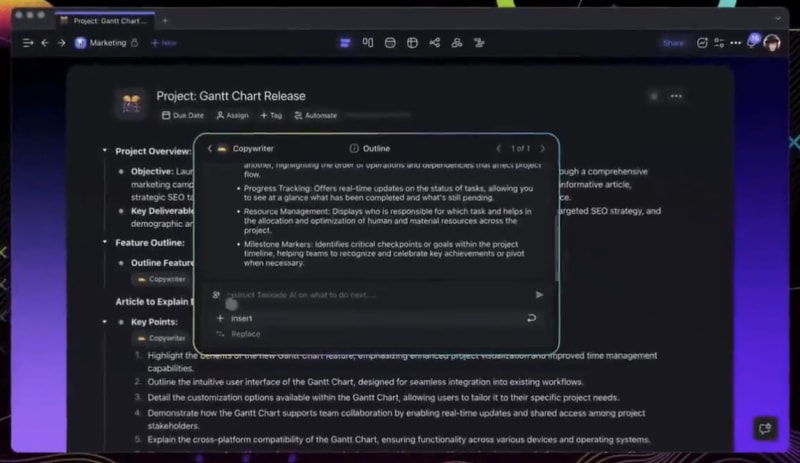
While Taskade can handle a lot of tasks for you, it also helps you accomplish more with your team. When you onboard a team, you get access to more custom templates, more knowledge sources per AI agent, and multi-agent teams.
Pricing: Taskade has a free plan with one AI agent and five daily AI requests. The pro plan ($8/user/month billed annually) includes custom AI agents and unlimited usage, while the teams plan ($16/user/month billed annually) includes multi-agent teams.
Scheduling apps
While you can get by with your system's default calendar, Apple's and Windows’ Calendar apps both leave a lot to be desired. Adding events in both apps can be clunky and time-consuming, especially on your phone. Meanwhile Google Calendar doesn't even have a dedicated desktop app so you have to access it via the web when you're on your computer. All are lacking a lot of handy scheduling functionality that's hard to live without once you've experienced it.
That's why we think a third-party calendar app and/or standalone scheduling apps are essentials in any productivity stack.
Here's what we recommend:
5. Calendly – For letting others schedule time with you or your team
For iOS, Android & the web plus browser extensions for Chrome, Edge & Firefox
Whether you're a hiring manager, sales rep, freelance designer, lawyer, personal trainer, or tarot card reader, if you meet with people for a living, scheduling is one activity you need to automate. No one does automated scheduling quite as seamlessly and robustly as Calendly.
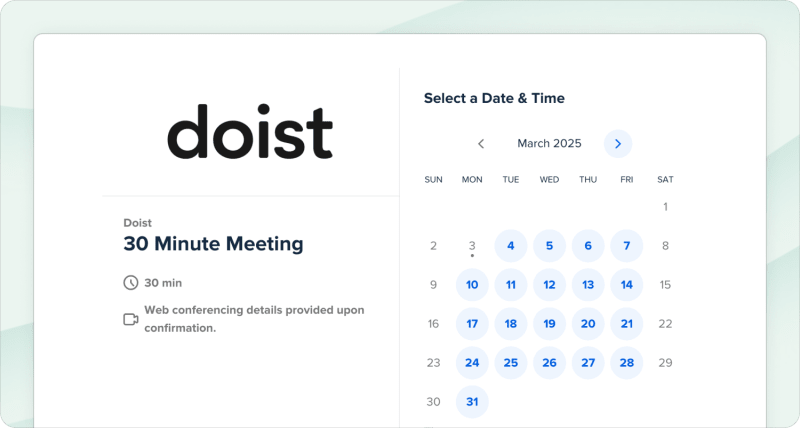
The app lets you set your availability, then create an event link you can share directly or add on your website so others can schedule a meeting with you. You can choose to be notified when new meetings are booked and those meetings will automatically be added to the calendar of your choice via integrations with Google, Outlook, and Office 365 calendars.
You can even set up automatic reminders for the people you're meeting with so they don't forget to show up. And if you work on a team, Calendly can assign a requested appointment to the person with the most availability.
If you're already happy with your calendar app and your livelihood depends on scheduling times to meet with people, Calendly is an essential addition to your productivity stack.
Pricing: Calendly has a basic free plan. The standard plan ($10/user/month) includes features like six calendars per user and integrations with other apps like Zapier and HubSpot. The teams plan ($16/user/month) includes meeting routing and integrations with even more apps. Calendly also has an enterprise plan starting at $15,000/year.
6. Doodle – For finding a meeting time that works for everyone
For the web, iOS, & Android
Doodle provides a straightforward and focused experience for finding a time that works for everyone.
Create an event, propose several time slots, then share the link with participants so they can vote on which times work best for them, which times they're definitely unavailable for, and which times they could make work if they have to.

If you're perfectly happy with the calendar app you use and don't want to switch to something with group scheduling built in (like our calendar pick above), Doodle is a great standalone app to have in your back pocket for easy group scheduling.
Pricing: Doodle offers a free plan with basic features, a pro plan ($6.95/user/month billed annually) with unlimited booking pages and one-on-ones and a team plan ($8.95/user/month billed annually) with co-hosting and other team features.
7. World Clock Meeting Planner – For scheduling across time zones
For the web
If you often meet with people in different time zones, knowing which time slots to suggest can be a struggle. This quick and easy web app lets you compare several cities side-by-side and visualize overlapping work hours.
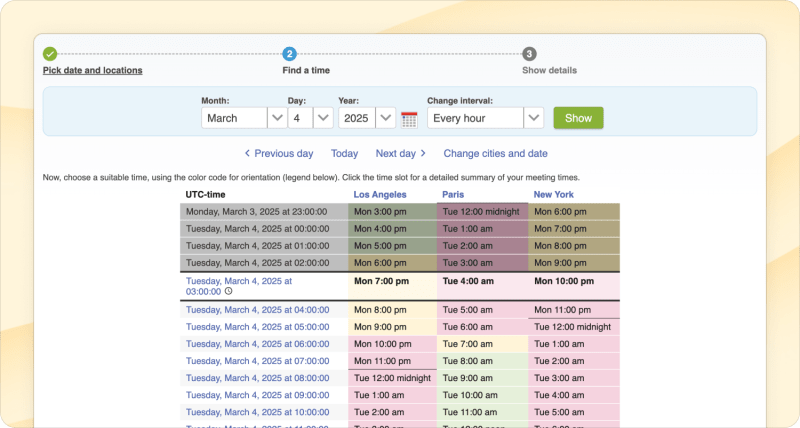
Just go to the World Clock Meeting Planner website, select the cities you want to compare times for, and see which times are green (or at least yellow) for everyone.
From our experience on a remote team of 93 people spread across the world from Australia to Barcelona to Seattle, we highly recommend World Clock Meeting Planner for taking the headaches and guesswork out of cross-time zone meetings.
Pricing: Free, but there are ads.
Collaboration
Depending on others to get your work done adds a whole other, messy dimension to productivity. These are the apps our fully remote team relies on every day to help ease the burden of communication and help keep everyone on the same page:
8. Twist – For keeping your team in sync asynchronously
For iOS, Mac, Android, Windows, Linux & the web
Full disclosure, Twist is a team communication app we built ourselves so we may be biased, but there's a reason we decided to build something new in the crowded space of team communication software.
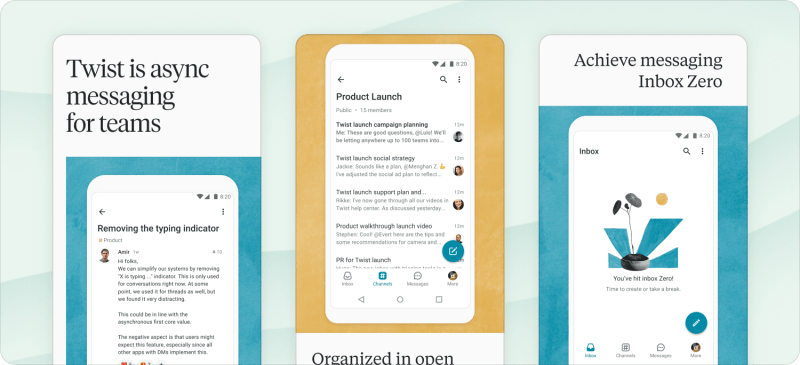
Rather than a chat-based model like most team communication apps on the market, Twist is threads-based. That means each conversation stays focused on a specific topic rather than bouncing around from one thing to the next and back again. Think more public forum than group chat. With topic-focused threads, it's easy to find the conversation you're looking for days, weeks, or even years later.
You can search for any topic and reference whole conversations with a single link. And because conversations stay organized by topic, communication can happen more asynchronously (rather than in real-time). People can jump in an hour or even a day later and still catch up on and contribute to the same discussion. This type of async communication makes it possible for people to disconnect to focus on "deep work" and circumvents time zone issues if you collaborate remotely.
Twist's calmer, more organized model of communication isn't for every team, but if chat apps like Slack or Microsoft Teams have felt too chaotic, disorganized, and time-consuming for you, Twist is worth checking out as a true alternative.
Pricing: Twist offers a free plan that gives users access to one month of messages, 5 integrations, and 5 GB of data storage. The unlimited plan ($6/user/month) gives access to the full comments/messages history, unlimited integrations, and unlimited file storage. Organizations with over 200 employees should reach out to our customer team.
9. Zoom – For (close to) flawless video calls
For the web, iOS & Android; Add-ons or extensions for Microsoft O365, Outlook, Firefox & Chrome
While our team communicates asynchronously in Twist 75% of the time, sometimes you need to talk things out in real-time. But video calls come with their own set of technical challenges. Nothing kills team productivity like connection issues on a video call. That's why our team relies on Zoom for any meetings over ~3 people.

The best thing about Zoom is that it just works. We've experienced better video quality and fewer connection issues with Zoom than any other video chat software we've used (Skype, Google Meet, etc), even for meetings with 12+ people. The video and connection quality paired with the Zoom's neat grid layout option is as close to being in a room with your colleagues as you can get when you're thousands of miles apart.
Pricing: Zoom’s plans increase in price based on number of hosts and participants. It offers a free plan, a pro plan ($15.99/month/host) that is recommended for small teams, a business plan ($21.99/month/host) for small and medium businesses, and an enterprise plan (custom pricing) for larger businesses.
10. Bubbles – For meeting transcriptions & action items
For the web (Chrome extension)
Zoom meetings can be great for connecting with colleagues. But when key team members have to miss out on meetings or when you want to complete top-priority action items efficiently, a little help can go a long way.
Bubbles is an AI note-taking app that records, transcribes, and generates action items for every Zoom, Meet, or Teams meeting. Just connect it to your meeting apps of choice, and it will join automatically. Afterward, you can share the recording with colleagues of your choice.
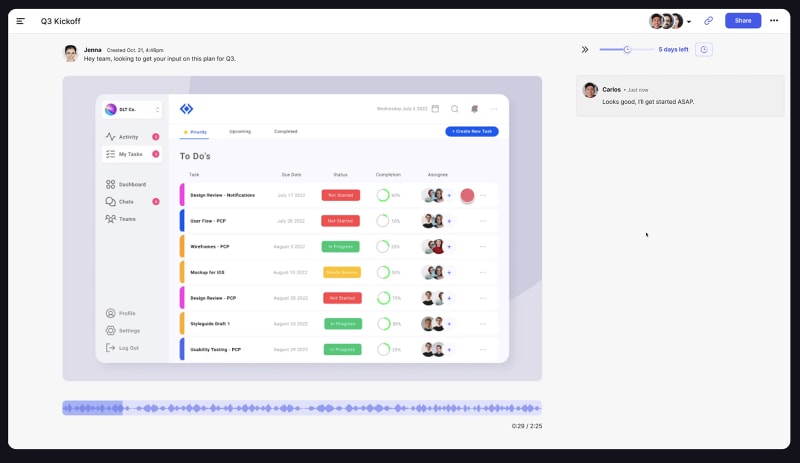
Although it’s a great app for productivity in real time, Bubbles is just as helpful with async communication. With its screen recording feature, you can share quick videos and tag team members, who can answer questions or share feedback with their own bubbles.
Pricing: Bubbles has a free plan for recording meetings up to 30 minutes. The pro personal plan ($18/month billed annually) has unlimited recordings and customization options, while the pro teams plan ($12/member/month billed annually) has the same features but with discounted pricing for teams.
11. Zight – For communicating visually
For Mac, Windows, iOS & Chrome
If a picture's worth a thousand words, then screencasts are worth at least two thousand. When you're trying to communicate efficiently, using visuals is key. That's where Zight comes in.
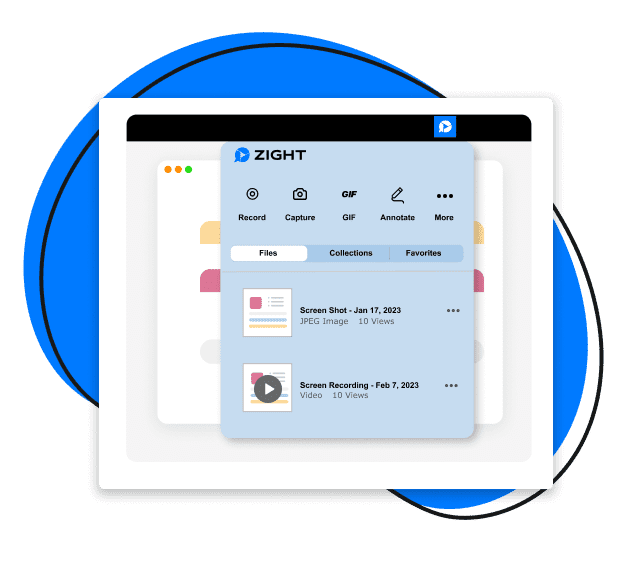
Zight makes it easy to create screenshots, screen recordings, webcam recordings, and gifs to share with anyone. At Todoist, we use it on a daily basis to report bugs, request design changes, clarify the intended behavior in an app, share updates on new things we're working on, give feedback, and more.
You can record audio and add annotations to make whatever you're communicating crystal clear. Unlike a screen share on a video call, everything is recorded and shared with the team (for us, that's usually in Twist) so everyone can find the visuals and go back to reference them when needed later.
Zight eliminates any back-and-forth and helps ensure everyone is on the same page, something that's particularly important if your team is remote and/or operates asynchronously.
Pricing: Zight offers a free plan for an individual user, a pro plan ($7.95/month billed annually) for an individual user that offers unlimited video recording and enhanced editing, a team plan ($8/user/month billed annually), and an enterprise plan (need a quote).
12. Kommodo - For documenting workflows & sharing SOPs
For iOS, Android, Mac & Windows plus a Chrome extension
Whether you’re a team of one or you manage several team members, standardizing tasks and processes can help you work more efficiently. The problem is that it isn’t easy to follow the same steps every time if you haven’t documented your processes.
With Kommodo, you can record every step of your process, add images and hyperlinks, and turn it into a standard operating process (SOP) that you can share with your team. Since Kommodo is also a screen recording tool, it can also create a video overview with a voiceover to add more context to your process.

Plus, you can create internal wikis with Kommodo’s page builder tool. I use it to compile all related SOPs on a single page so I can share them all easily (and answer a lot of questions in one place).
Pricing: The free plan includes unlimited screen recordings and SOPs with up to 10 steps. The paid premium plan ($9/month billed annually) removes limits and adds editing features.
App callout note: These are just 3 of the collaboration...
Note-taking apps
Learning is one thing. Remembering the things you learn and finding that information when you need it again later is a whole other story. A good notes app makes it easy to organize (and search for!) your notes, learnings, musings, brainstormings, and media saved from around the web. Here's what we recommend:
13. Notion – For creating your own personal wiki
For iOS, Android, Mac, & Windows; extensions for Chrome and Firefox
Notion is one of the most popular note-taking and organizational tools and for good reason. The app is a virtual Swiss Army knife of organizational tools.

Notion organizes notes into broad categories on the left with nested hierarchies. Alongside minimally formatted text, you can visually add and display 30+ different types of media including images, videos, and link snippets alongside objects like checklists, to-do lists, Kanban-style boards, calendars, spreadsheets, and more.
You can also cross-reference notes to build a complete, searchable wiki, for personal use or with a team. Plus, Notion AI lets you generate text, search for answers, and analyze content in your notes and beyond.
The app syncs across desktop and mobile with apps for Mac, Windows, Android, and iOS. And of course, no notes app would be complete without a web clipper for both Firefox and Chrome.
Todoist’s Growth Marketer, Hugo, relies on Notion to keep his thoughts, ideas, and projects organized:
“Notion is my main place for thinking with words, jotting down ideas, consolidating my learnings, and keeping all of that quite organized. I also use it for personal projects like: what I need to think about for my sister's wedding ceremony, tracking my Todoist perks, or keeping an overview of revenues/expenses for finances (with tables), books I read (with a gallery), and sometimes bookmarking things I've read for later reference.
The sheer number of features and the infinite flexibility of Notion can make getting started feel daunting. But once you learn the ins and outs, it becomes clear that it's the most powerful notes app out there for organizing and visualizing information exactly the way you want it.”
Pricing: Notion is free to use with limits on storage, and various paid plans — plus ($10/month billed annually), business ($15/month billed annually), enterprise (custom pricing) — give you unlimited storage and version history along with other features. Note that Notion AI is available as an add-on for $8/month (billed annually).
14. Bear – A notes & writing app for Apple users
For Mac & iOS
The Bear app is a crossover between a notes app and a writing app. The beautiful, minimalist writing experience is a joy to compose in and content can be exported into various formats to use elsewhere. Cross-link notes to build a body of work and use hashtags for flexible organization.
If you're an Apple user who loves a minimal writing environment and wants to keep journal entries, essays, or longer musings organized alongside their other notes, Bear is a great option.

Pricing:Free, but the pro version ($2.99/month or $29.99/year) lets you sync notes across devices, gives you more themes to choose from, and offers more export options.
15. Google Keep – If you prefer the Google ecosystem
For iOS, Android & the web
If you’re an Android user or if you’re already invested in the Google ecosystem, Keep is an excellent alternative to Bear. Like Bear, Keep lets you jot down notes on any topic using a combination of text and images. Keep’s labeling system makes it easy to organize notes so you can easily find them again. You can also add reminders so you don’t forget to take action on certain notes.
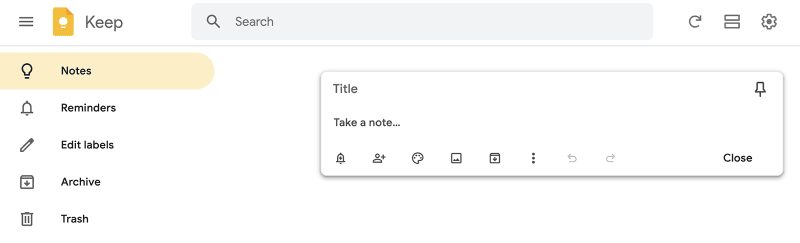
Plus, Keep is integrated with Google Docs. As a writer, I use it to save ideas for articles, which I can then turn into Google Docs drafts. And when I need a break from typing, I use Keep’s dictation feature to create audio notes, which the app transcribes automatically.
Pricing: Completely free to use
Automation apps
The more manual tasks you automate, the more time you free up to focus on deep work. While many productivity tools include automation features, the following apps specialize in automation. Here are the tools we recommend to speed up your workflows:
16. Zapier – For building your own custom workflows between apps
For the web & Chrome
Your productivity stack and workflows are unique. Even with all of the integrations that modern software comes with, there are bound to be apps you wish worked together that just don't. That's why we recommend Zapier for building your own custom app integrations and automatic workflows – no coding required.

In simple terms, Zapier lets you automate actions between apps. Choose a trigger – for example, whenever you receive an email in Gmail – then select a subsequent action – save any attachments in Google Drive. That "zap", as they call it, will then run automatically in the background without any extra effort required on your part.
One-to-one app connections like that are free, but the paid version gives you the power to daisy chain several actions across multiple apps. To continue with the above example, you could extend the zap to add a task to Todoist to review the new document in Google Drive with a link right to the document so you won't waste any time.
Once you get the hang of setting up zaps, you'll find all sorts of repetitive things you do every day that you can automate away. Here are some of Zapier's most popular zaps to get started with and here are 20+ zaps you can set up with Todoist.
Pricing: Zapier offers a free plan with unlimited zaps per month, a professional plan ($19.99/month) with multi-step zaps, team plan ($69/month), and an enterprise plan (custom pricing).
17. IFTTT – For automating simple tasks
For iOS, Android & the web
IFTTT is an acronym for “if this, then that.” With this simple app, you can create tons of different automations for work or home. For example, you can automatically track your work time based on your location, create Google Calendar events from notes, or even save X posts you liked as Todoist tasks.
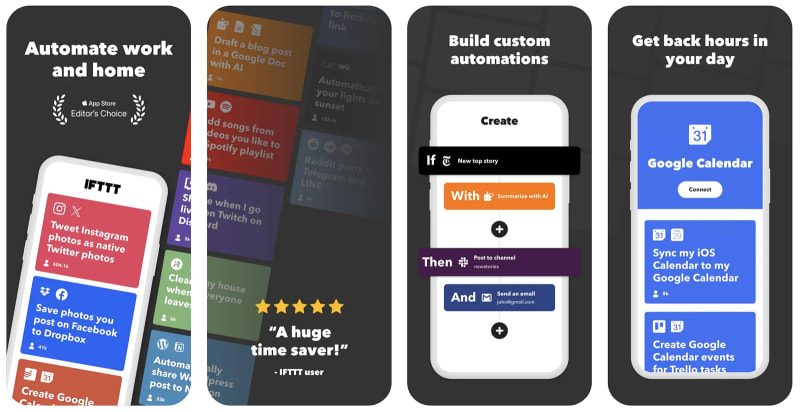
Think of IFTTT as a virtual assistant. It can help you do almost anything, and it doesn’t require any complex setups. Just connect the apps you want to use and enable the automation (applet). If you’d like to add a custom automation, however, you always have the option to build from scratch.
Pricing: The free plan includes two applets and unlimited runs. With the pro version ($34.99/year) you get 20 applets and increased rate limits, and with the pro+ version ($149.99/year) you get unlimited applets and AI services.
18. Magical – For filling in forms, databases & messages automatically
For Chrome and Edge
If you spend way too much time (re)writing the same message to different recipients, shifting data from one interface to another, or figuring out how to set up automations, you need an app like Magical. In addition to automating tedious tasks like data entry, this app also personalizes messages and expands text based on shortcuts.
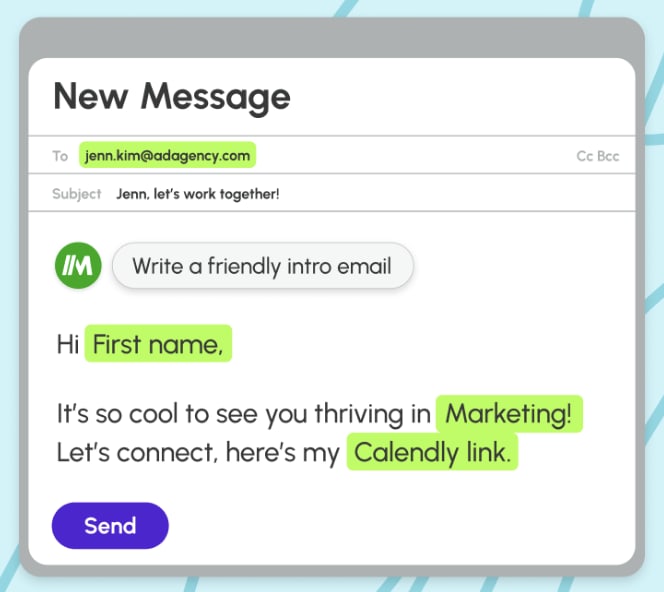
With Magical, you don’t even have to know which automations you want to set up. The app suggests them for you, based on how you work. You can also record your workflow and let Magical’s AI-powered tools automate the process for you.
While some automation tools can only connect a standard list of apps, Magical doesn’t have these limits. In addition to connecting 5,000+ popular apps, Magical can also automate custom-built software.
Pricing:Free for limited text expansions and automations. The core plan ($6.50/month) has unlimited text expansions for a single user, and the advanced plan ($12/month) has unlimited text expansion for teams. For teams of 10+ people, the enterprise plan (custom pricing) has custom limits and enterprise governance.
AI-powered chatbot apps
From researching ideas to analyzing data, AI chat tools have many valuable use cases. In some cases, they can even replace (or supplement) traditional search engines. Here are two tools we recommend getting to know:
19. Claude – For brainstorming & generating ideas
For iOS, Android & the web
Ever wanted an app that could help you get more out of brainstorming sessions? Or a tool that could help you get past writer’s block? Or maybe even an app that could analyze documents to speed up the processing time?
Claude is an AI assistant that can do all of that and much more. As a conversational chatbot, Claude can answer questions, generate content, and analyze images and text. It also has advanced reasoning capabilities and language translation skills, making it especially helpful for multilingual teams.
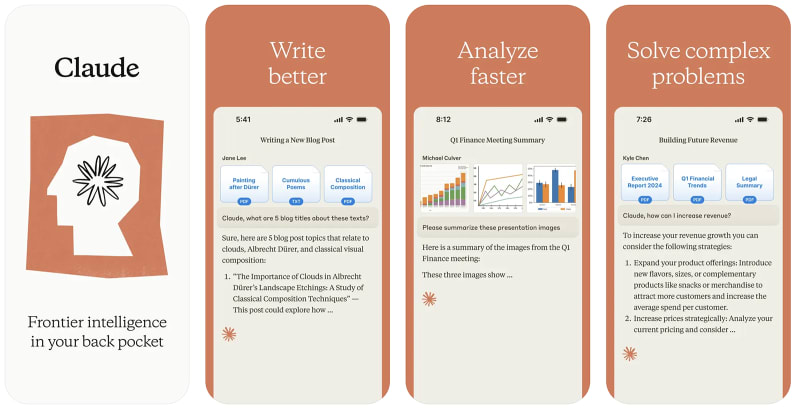
If you work with a team, Claude’s collaboration tools make it easier for everyone to get more done together. Teams can share chats and analyses so everyone can build on the same foundation.
Pricing: The free plan includes access to Claude 3.5 Sonnet, while the pro plan ($20/month) includes access to Claude 3 Opus and Haiku plus priority bandwidth. For teams, the team plan ($25/user/month) includes chat sharing, while the enterprise plan (custom pricing) has higher usage limits and added security features.
20. Perplexity – For researching & exploring topics
For iOS, Android & the web
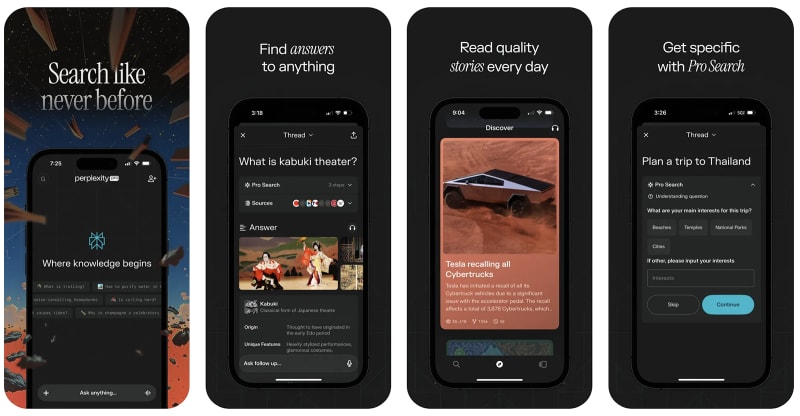
Whether you’re just starting to research a new topic or you want to do a deep dive, Perplexity can help. As an AI-powered search engine, this app can answer questions, summarize online or offline information, and assist with brainstorming.
Plus, Perplexity’s copilot acts as a custom search engine. Instead of relying on helpful yet generic answers to your questions, you can get personalized responses with the app’s pro search feature.
Pricing:Free for unlimited quick searches with the standard Perplexity AI model. The professional version ($20/month) includes 300+ pro searches with your preferred AI model, while the enterprise version (custom pricing) has added security for teams.
Focus apps
Time management and task management have been around for decades, but attention management may be an even more important skill to develop if you want to succeed (and stay sane) in the twenty-first century. The next group of recommended apps will help you curb the distractions of the internet and hone your ability to focus on high-value, cognitively demanding tasks that productivity expert Cal Newport calls "deep work".
21. Simple Interval Timer – For working in timed sprints on iOS
For iOS
This simple mobile app lets you time intervals. Nothing more, nothing less. While it’s technically designed for tabata and HIIT workouts, our Social Media Manager, Fadeke, has found that they're perfect for timing focused work sprints too:
“Here’s a 10+ year practice that’s been very helpful to me: if you have a seemingly endless task to do, divide it into timed sections and get going using an interval timer. Very useful for studying (i.e. review 5 chapters for 30 minutes each with a 10 minute break between each) or writing (create a 20 part outline and devote 20 minutes to each section with a 5 minute break between each).
Putting a time limit on something will help you concentrate and force you to work quicker. You’ll likely go over the blocks of time or need more breaks that you plan for, but the mental exercise of adding arbitrary constraints is very helpful imo. Also helps you escape Parkinson's law where a first draft of a blog post can take however long you want it to: 5 weeks or 5 hours. 👌🏾”
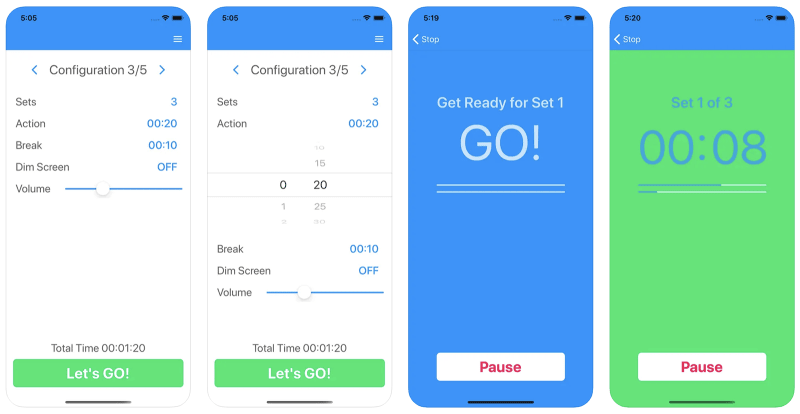
Pricing:Simple Interval Timer for iOS is free, but for $2.99 you can remove ads.
22. Interval Timer – For working in timed sprints on Android
For Android
Like Simple Interval Timer, Interval Timer is a simple app designed for timing both workouts and work. Use it to implement the Pomodoro time management technique (25-minute sprints with 5-minute breaks and a longer break after each set of four sprints) or tweak it to find the work:break ratio that works best for you.
If you find you can't stay focused for 25-minutes, start with 15 or even 10. The ability to focus is like a muscle that you can build over time by stretching your sprint intervals just beyond what you could do yesterday.

Pricing: Completely free to use.
23. Freedom – For blocking distracting sites and apps on all your devices
For iOS, Android, Mac, Windows, Chrome OS, and Linux; Browser extensions for Chrome, Firefox, Edge, and Opera
Today's apps and websites are intentionally designed to be addictive. For months after I deleted my Facebook account I would still find myself mindlessly typing "facebook" into my browser and landing on the page without ever having consciously decided to go there. Sometimes our bad internet habits are so strong that we need a little external enforcement to help us kick them for good (or at least during work hours). Enter Freedom.

The Freedom app blocks distracting apps and websites on your phone and computer so you can take back control over your time and attention. Choose specific sites and apps you want to block or choose websites to whitelist and block all the rest. You can even block the internet itself if you want to enforce offline time.
Start a focused session whenever you want or schedule them out in advance. If you really feel you can't trust yourself, you can choose to enter Locked Mode that prevents you from ending a block session early. But the best thing about Freedom is that it syncs your blocked time across all your devices so you can't pick up your phone to browse TikTok if it's already blocked on your computer.
Install Freedom and take productive time back from the websites and apps that distract you most.
Pricing: The free trial will let you start 7 blocking sessions. After that, you’ll have to pay $8.99/month or $39.99/year. Alternatively, you can opt for a one-time payment of $199 and have access forever.
24. Forest – For a gamified way to break your phone addiction
For iOS & Android
The mere presence of your phone literally makes you dumber, and yet we can't stop ourselves from picking it up to check our notifications. Fight that compulsion with the Forest app.
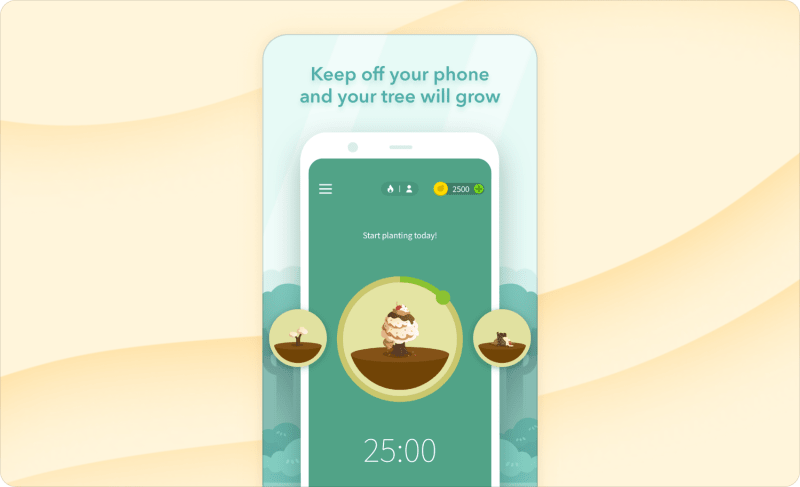
Forest is a sweet little mobile app that gamifies your attempts to curb your phone addiction. Instead of outright blocking distracting apps, Forest lets you plant and nurture little focus trees.
When you want to focus on your work (or be more present at dinner with friends), you plant a tree. As you continue to focus on things that aren't your phone, your tree will grow. If you leave the app, your tree will wither and die. As you use the app over time, you'll grow a lush forest of focus trees. Sometimes our failure to stay focused and be productive can feel really heavy. That's why I love Forest's fun and light-hearted approach to breaking our phone addiction. Plus when users spend virtual coins they earn in the app by staying focused, the Forest team donates money to plant real-life trees somewhere in the world. It just makes you feel all warm and fuzzy on the inside.
Pricing: The Android app is free to use, but the pro version (a one-time payment of $3.99) will let you plant real-life trees and adds some nice time tracking and social features to compete with friends. The iOS app costs a one-time payment of $3.99 to install and then offers additional in-app purchases for upgrades that help you get more virtual coins for each tree you plant.
25. Spotify – For promoting focus through music
For iOS, Android, Mac, & Windows
Numerous studies have found a connection between certain kinds of music and productivity. But Todoist's Social Media Manager, Fadeke, uses music a little differently to train herself to get into focused work mode:
“My preferred way to use music for focused work is some form of Pavlovian conditioning:
Use the same playlists to get into “work mode”
Use the same genre to get into “work mode”
Listen to the same song over and over again on repeat (literally, for hours, days, or weeks 😜😵)”

Spotify is our go-to music app, as it has an incredible amount of selection packaged in an intuitive interface. Build out your own playlists or curate a "play next" queue as you go.
Discover new music with tailored recommendations based on your tastes or browse Spotify's extensive playlist library built for everything from productivity to workout to party tracks. Or use the app’s AI-powered playlist builder to tell it exactly what you want to hear.
You can find and play most of the music you could ever want for free, but if you want to download music onto your devices to play offline, you'll have to pay for the premium version.
Find a Spotify productivity playlist or curate your own and use it as an environmental trigger for getting in the zone. (For cognitively demanding work, studies show that simple, down-beat music without lyrics boosts performance while upbeat, lyric-heavy music hinders it.)
Pricing:Free, but the premium version ($11.99/month) lets you download music to listen to offline, gets rid of ads, and gives you unlimited skips. The duo version ($16.99/month) allows two users, while the family version ($19.99/month) lets you add up to six listeners on the same account.
26. Brain.fm – For functional, distraction-free music
For iOS, Android & the web
If you’re serious about focus, consider setting your playlists aside and tuning into functional music at brain.fm. This app generates music that’s scientifically proven to increase focus — and it even has support from the National Science Foundation.
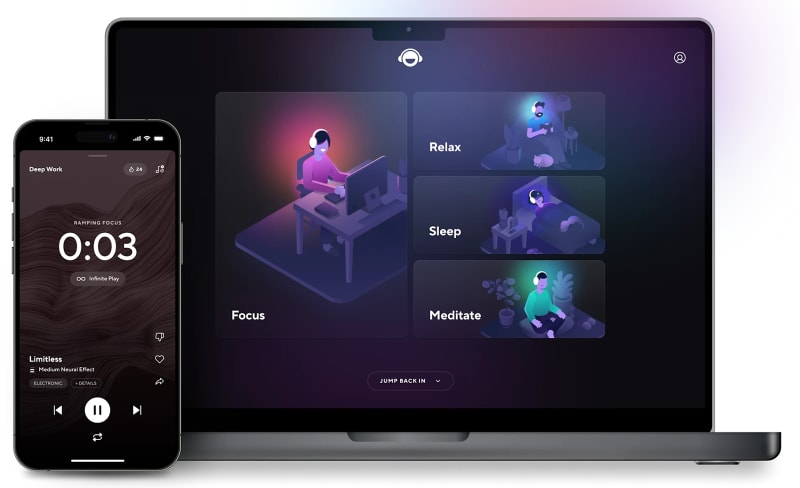
With brain.fm, you listen to music that’s designed to have specific effects on your brain, which helps you get into your desired mental state. Since the app is distraction free, you can stay in the zone without worrying about compromising your flow state.
Pricing: Pay $9.99/month or $69.99/year for unlimited access to the platform’s music.
27. Noisli – If you prefer background noise over music
For iOS, Android & the web
If you're one of those people who works better with the background buzz of a coffee shop, Noisli is the app for you. The simple web app lets you mix your own background noise. Listen to a rainstorm in the forest, hear raindrops pattering in a coffee shop, enjoy a fire crackling in the wind, or combine them all if that's what feels right. Noisli also has recommended mixes depending on whether you want to be productive or relax.
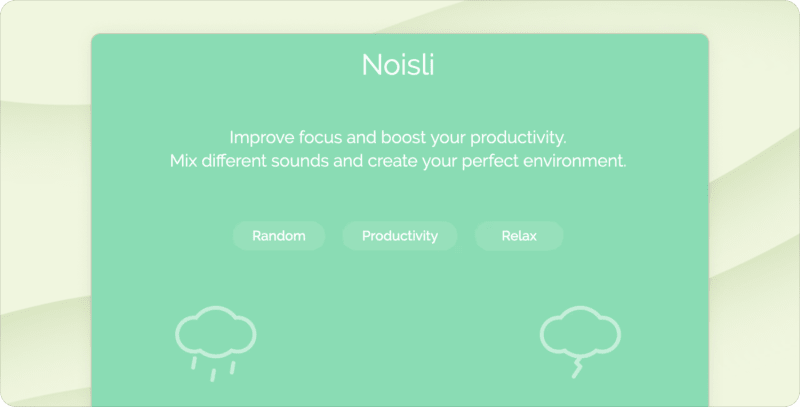
Pricing: The free plan includes 16 sounds and up to 1.5 hours of streaming per day. The pro plan ($10/month billed annually) includes 28 sounds and unlimited streaming, while the business plan ($24/month billed annually) supports two users and unlimited streaming.
Lifestyle & habit tracking apps
This group of apps isn't traditionally thought of as "productivity" apps, but the habits that support a healthy lifestyle are even more important to your productivity than which task manager or notes app you use. Here are the apps we recommend for supporting a healthy lifestyle:
28. Sleep Cycle – For an alarm clock that tracks & improves your sleep
For iOS & Android
Sleep is the most productive activity you can do each day. But when things get busy, it’s often the first thing to go. That’s why we added Sleep Cycle to the list.
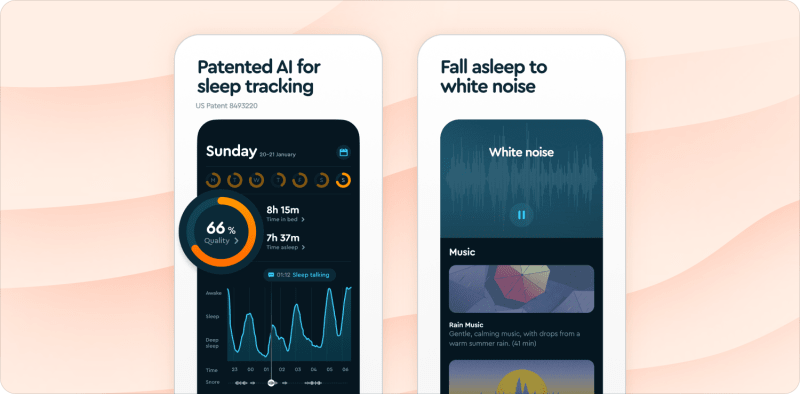
Sleep Cycle is an intelligent alarm clock that helps you understand and improve your sleeping habits. Using either your phone’s microphone or accelerometer (no additional hardware required), the app tracks your sleep stages throughout the night and wakes you up when you’re at the lightest possible sleep stage within the half hour before you’ve set your alarm. Instead of waking up groggy and disoriented from deep sleep disruption, you’ll start the day feeling refreshed and ready to get out of bed (or at least more so).
In addition, the app serves up neat stats on each night of sleep including how many hours you spent in bed, your overall sleep quality rating, and a graph to show how you moved through each sleep stage. You can use this information to set goals and discover correlations between the things that improve your sleep and the things that disrupt it.
As someone who usually hits their snooze 10times before finally dragging myself out of bed, I can attest to how effective Sleep Cycle’s smart alarm timing is at getting mornings off on the right foot.
Pricing: The free version gives you the smart alarm functionality and most sleep stats. The premium version ($29.99/year) lets you see long-term sleep trends, add sleep notes so you can see how different things (like alcohol or coffee) affect your sleep, wake up mood to see how different things affect how you feel when you wake up, and a new sleep aid that gives you bedtime stories and soundtracks to fall asleep to.
29. Headspace – For starting a regular meditation practice
For the web, iOS, & Android
Meditation has been shown to relieve stress, control anxiety, improve sleep, and lengthen attention spans. But what does it even mean to meditate? How do you get started and how do you find the time in a busy day to sit and do nothing? Think of Headspace as an on-demand meditation guide to help you build your mindfulness practice.
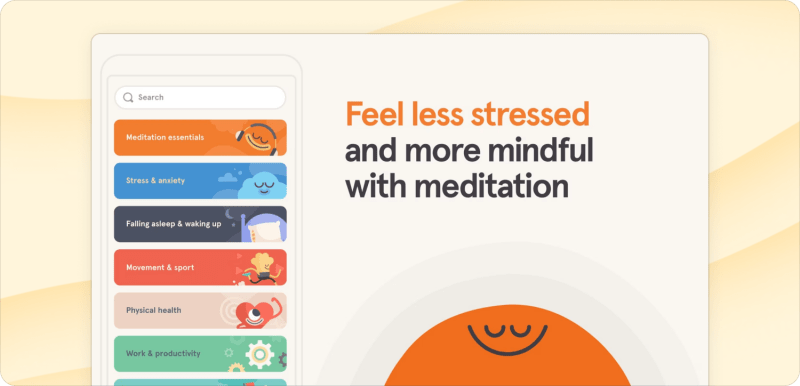
Headspace gives you access to hundreds of guided meditation tracks right on your phone with themed sessions for everything from stress-relief to focus to sleep and even sports performance. Only have five minutes? Or even just one? The app has bite-sized meditations that fit into even the busiest of schedules. They’re perfect for fitting into breaks between timed work intervals.
Though the paid version can be a bit pricey, Headspace has the widest variety of high-quality guided meditations out there, conveniently organized around whatever goals you’re trying to achieve, and packaged in a beautiful, easy-to-use interface. We recommend it wholeheartedly for anyone starting out with their meditation practice or trying to get back on the bandwagon.
Pricing: You can download the app and get access to Basics meditation course for free, but after that you’ll have to pay for full access to the Headspace guided meditation library ($12.99/month or $69.99/year, which is a little less than $5.99 a month).
30. Streaks – For building strong habits on iOS
For iOS
Whether it's writing 1,000 words a day or getting to bed at the same time every night, good habits are the building blocks of productivity. A good habit tracker will help you build positive habits.
Streaks, our pick for iOS, harnesses the power of "The Jerry Seinfeld Method", also known as "Don't Break the Chain", by encouraging users to take daily action and not skip a day of working towards their goals and habits.

The app will help you build consistency with built-in statistics that showcase your longest streaks, number of successful days, and your most productive time of day and day of the week.
Streaks also has a way to effectively gamify habits. The longer your streak, the higher your score. Miss a day and your streak resets to zero. You can also use Streaks to break bad habits, like smoking or drinking soda.
Pricing: Streaks is $5.99 and integrates with other apps and devices (like the Apple Health app) to input extra data about habit completion.
31. Loop – For building strong habits on Android
For Android
Our pick for Android, Loop offers many of the same features as Streaks – custom habit tracking, beautiful graphs and stats, streak-building, reminders, and more.
However, Loop offers a bit more flexibility than Streaks when it comes to not breaking the chain. The app calculates a score for each of your habits so it doesn’t feel like the end of the world if you miss a day or two in a long habit streak. The app also allows you to track habits with flexible schedules like going to the gym every Monday, Wednesday, and Friday.
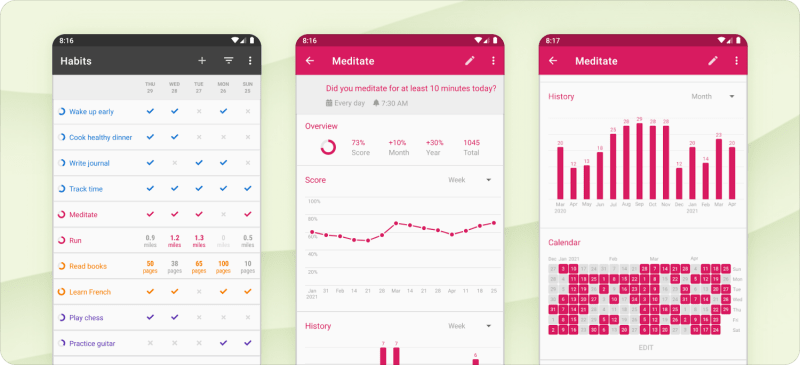
Use Loop to track all your habits in one place – walk 10,000 steps, 2 coffees/day maximum, flossing your teeth – and stay motivated as you work towards a healthier and more productive lifestyle.
Pricing: Loop is free (no ads either) and open source.
Reading & learning apps
There's a reason why people like Warren Buffet, Bill Gates, and Oprah Winfrey reserve so much time in their schedules for reading and learning. Expanding your knowledge and exposing yourself to new ideas is one of the best investments you can make for your productivity. Here are the apps we recommend to make the time for learning in your life:
32. Kindle – For reading books instead of browsing social media
For iOS, Android, Mac, Windows & web
How many times have you found yourself standing in line at the grocery store or waiting for an appointment and you reflexively pull out your phone to browse Instagram or Reddit? It's a habit that's hard to break. But the best way to break a bad habit is to replace it with something you actually want to do.

Whenever you find yourself bored and reflexively reaching for your phone, open the Kindle app instead of X and make reading books a habit that already fits right into your day.
The Kindle app gives you access to a world's worth of books in your pocket and lets you customize the font, text size, background color and more so you can read exactly the way you want to. (Dark mode for night-time reading is a lifesaver!)
It syncs across your devices so you can pick up on your Kindle device or computer where you left off on your phone and vice versa. You can even share ebooks with your family (up to one adult and four children in your Amazon Household).
Pricing: The app is free, but you'll have to buy each ebook individually. Prices vary by book.
33. Audible – For listening to books and podcasts
For Android, iOS, Mac, & Windows
Audible from Amazon will give you the biggest selection of audiobooks and lets you download titles to your device to play offline. The audio player is simple and straightforward with a few extra options like speeding the audio up (though reading at a more leisurely pace can actually help you retain more) and a sleep timer that automatically shuts off the app after a set number of minutes.
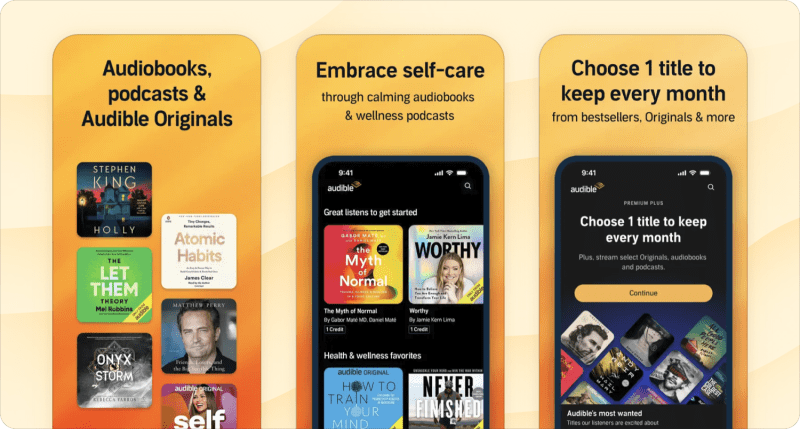
Audible also has a library with thousands of podcasts. However, if you want to listen to podcasts only (not audiobooks), there are less pricey options elsewhere in this list.
Pricing: Listen to select audiobooks and podcasts with the plus plan ($7.95/month) or get one credit per month for any audiobook plus unlimited access to the plus catalog with the premium plus plan ($14.95/month). With the premium plus plan you also have the option to upgrade for more credits.
34. Libby – For reading & listening to library books (for free!)
For iOS, Android, Amazon Fire, and web
The on-demand convenience of Kindle and Audible can't be beat, but they can get pricey. There's another way to get (almost) every audiobook and ebook Amazon offers for free from a little old place called your local library.

Libby makes it easy to browse, search for, and borrow ebooks, audiobooks, and even magazines. However, depending on the popularity of the book and the number of licenses your library has, you may have to wait 18 weeks to listen to Harry Potter and the Chamber of Secrets and you'll only have access to it for a limited number of days before you have to "return" it.
If you manage your "on hold" queue right you can get a steady pipeline of books you want to read without much waiting around and you'll be supporting your local library in the process. Win-win.
Pricing:Free with your local library card
35. Feedly – For curating your own newsfeed
For the web, Android, iOS, Chrome & Firefox
Better yet, instead of letting Facebook or X algorithms determine the content you see in the first place, use an RSS feed reader to take back control over your newsfeed.

Feedly makes it easy to find and subscribe to new RSS feeds, browse what's new in those feeds, and read things in a minimalist, distraction-free format.
You can organize feeds into bigger topic streams like "Tech News" or "Fitness."You can also save articles to read later inside Feedly itself or use their integration to save it to Pocket to keep your whole reading queue in one place. Plus, you can use Feedly’s AI tool to summarize reads for faster reading.
Get Feedly and be the person everyone wonders how they manage to stay on top of so much information with only 24 hours in the day.
Pricing: Feedly offers a basic free plan; a pro plan ($6/month billed annually) that includes unlimited feeds and the ability to perform “power searches” and share to other apps like Zapier. With the pro+ plan ($12/month billed annually) you get up to 2,500 feeds and Feedly AI feeds, while the enterprise plan (custom pricing) offers shared feeds, boards, and other team features.
Utility apps
These are the apps that work largely in the background to make the boring things you repeatedly do on your computer faster and easier. They're not as sexy as a new note-taking app, but they will save you a ton of time and headaches over the long-term. Here are the ones we recommend that everyone use:
36. Paste – For managing your clipboard
For Mac & iOS
We've all been there. You go to paste something you've copied only to realize you've already overwritten it with something else.
In some cases, you might not be able to replicate the content. In other cases, it may take time to re-copy the information. The few seconds it takes might not seem like much, but compounded over time it can add up. That's where a clean and simple clipboard manager comes into play.

For Mac and iOS users, Paste is a beautifully designed app that keeps a history of everything you've ever copied to your clipboard – text, links, images, email addresses, etc. When you need to paste something that isn't just the last thing you copied, use the customizable keyboard shortcut command+shift+V to pull up your clipboard history and select the item you want to paste in.
You can also organize clipped information you need often into specific "pinboards" (eg "Email replies" or "Code snippets") for easy access. Your clipboard history is saved in iCloud and syncs across all the devices you have Paste installed on – for example between your computer and your iPad or iPhone.
Pricing: The app is available for $29.99/year which covers all of your devices.
App callout: Windows 10 already comes with clipboard history ...
37. Grammarly – For spell check and AI-powered writing assistance
Apps for Mac, Windows, & Microsoft Office; a keyboard app for iOS & Android; extensions for Firefox, Chrome, Edge, & Safari
You've seen the little red and green squiggly lines of automatic spell checks built into pretty much any piece of software that allows you to write content in it. But you haven't experienced the full power of spell check until you've used Grammarly.
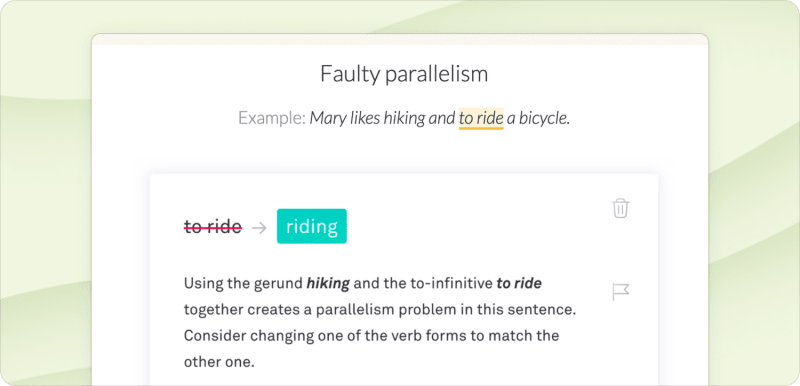
Not only does Grammarly check for the usual grammar and spelling mistakes, it will also give you suggestions to improve style, tone, word choice, clarity, and readability to make all your writing “bold, clear, and mistake-free”. I write for a living and I still feel like I'm back in English class every time I use Grammarly to double check my writing.
Plus, Grammarly can also rewrite paragraphs, generate text based on simple prompts, and provide suggested replies to emails. And with the paid version, you can ensure your content stays on-brand.
Pricing:Free, but the pro version ($12/month billed annually) will give you more advanced corrections for grammar, punctuation, sentence structure, and style. There are also more expensive monthly billing options.
38. Bitwarden – For managing your passwords
For Windows, macOS, Linux, Android, & iOS; Browser extensions for Chrome, Edge, Firefox, Opera, Safari, Brave, Vivaldi, Tor & DuckDuckGo
Nothing kills your productivity like the hassle of dealing with a hacked account. Security experts recommend using a unique, randomly generated (i.e. impossible to guess) password for each of your accounts, but how are you supposed to remember all of them?
That's why a password manager is one of, if not the most, important apps to have in your productivity arsenal. There are a lot of strong contenders out there, but we recommend Bitwarden.
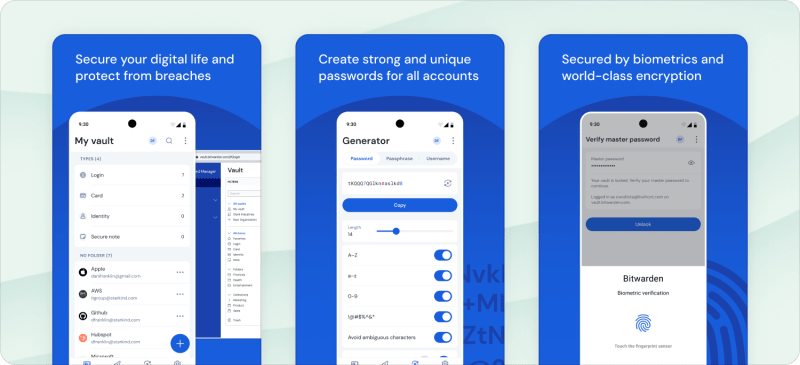
Bitwarden is an open-source password manager that generates unique, random passwords for each new account you create and saves all of them in a secure vault accessed via one master password.
It comes with apps for every platform and extensions for every browser you can think of so you can auto populate your login info on any website. And, unlike a lot of their competitors, Bitwarden syncs your passwords across all your devices with their free version.
If you're not already using a password manager, stop whatever you’re doing and download Bitwarden right now.
Pricing:Free version gets you all of the essential password management features plus cross-platform sync. You can also share passwords with one other person on the same account. A premium ($10/year) version gets you 1GB of encrypted file storage, an integrated authenticator, and health reports among other features.
There are also paid group plans for families (up to 6 users for $40/year), teams ($48/year for unlimited users and premium features), and enterprise ($60/year for unlimited users and enterprise policies) with more advanced features for managing and sharing passwords across groups.
39. Shift – For consolidating all your everyday web & desktop apps
For macOS & Windows
If you're anything like me, you likely spend a good chunk of your day shuffling through dozens of tabs and windows trying to find the app you need. Shift is the centralized workspace you need.

The Shift app brings all of your apps and accounts into one place and makes it easy to switch between them. That means no more logging in and logging out of accounts or bouncing between tabs in your browser. Here's what Todoist's Head of Business Development, Chase, had to say about the app:
“I’ve really enjoyed using Shift to consolidate the tools I use on a daily basis into one place. I have all my email accounts and g-suite tools easily accessible (calendar, sheets, docs, forms) and then other tools like Twist, Zendesk, Paper, Todoist, Intercom, etc that I’m in and out of all day, everyday.”
Depending on the features you want access to, Shift can get pricey. But when I think about all of the time I waste in a typical workday just looking for the right app, the price becomes easy to justify.
Pricing: The free plan will let you add up to 2 accounts (eg, a personal Gmail and a work Gmail) and desktop notifications. The advanced plan ($149/year) adds in Google Services, Chrome extensions, and unified search among other features.

Becky Kane
Becky writes, edits, and attempts to follow her own productivity advice from her home office in Minneapolis, USA. 🚲🛶☕️