
How to Complete Your Own Annual Review
Reflect on work, health, finances, and more with a personal year in review

At the end of each whirlwind year, it’s hard to decipher where the last 365 days went. An annual review is a moment (or two) to pause and consider how you spent your year –– the highs, the lows, and everything in between.

The highs and lows of a year
James Clear, a productivity expert and the author of Atomic Habits, publicly shared a annual review from 2013 to 2019:
Basically, my Annual Review forces me to look at my actions over the past 12 months and ask, ‘Are my choices helping me live the life I want to live?’”
In the absence of regular reflection, we move from year to year without celebrating our successes, learning from our failures, and assessing whether what we’re doing in life is what we actually want to be doing in life. Sitting down to review your life, one piece at a time, will uncover hidden lessons and important insights you can take into the next year.
This article will guide you through completing an annual review of all the important aspects of your life –– work, productivity, health, finances, relationships, and more –– including real-life examples for inspiration. By taking time to reflect and arming yourself with awareness, you’ll be better equipped to face the year ahead.
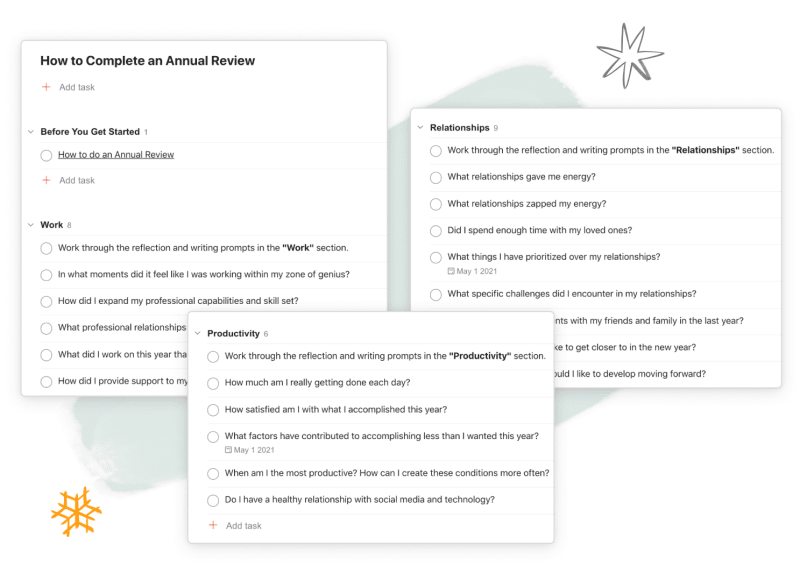
Download our annual review Todoist template
App callout note: Download our annual review Todoist template to...
Why you should do an annual review
Sitting down to do an annual review takes time, patience, and some tolerance for discomfort as we ask ourselves the hard questions. The end of the year – when holiday hecticness takes hold and we’re longing for a break – hardly feels like a time to dig through our year in search of answers. But an annual review is an opportunity to discover what may have been hidden and search for insights we can use in the year to come.
Dedicated time for reflection
Though there are 8,760 hours in a year, most of us spend scant few on targeted reflection. It’s one of those important-but-not-urgent tasks that fall to the bottom of our lists. Instead, we find ourselves on auto-pilot, defaulting to knee-jerk reactions and well-worn habits.
An annual review is a chance to take a handful of those hours and walk away with insights to inform the year to come. A quiet revelation that arises from your review might convince you to seek out a more fulfilling job or reconnect with a loved one. Without a force to knock us off our tired trajectory, we can default to doing the same things day in and day out. Your annual review can be that force.
Celebrate your accomplishments
Our minds are primed to focus on the negative. We fixate on what we should have said, the opportunity unseized, the promotion that could have been. Even when we do reach our goals, we forget our wins as quickly as they come, stretching out our hands for the next achievement.
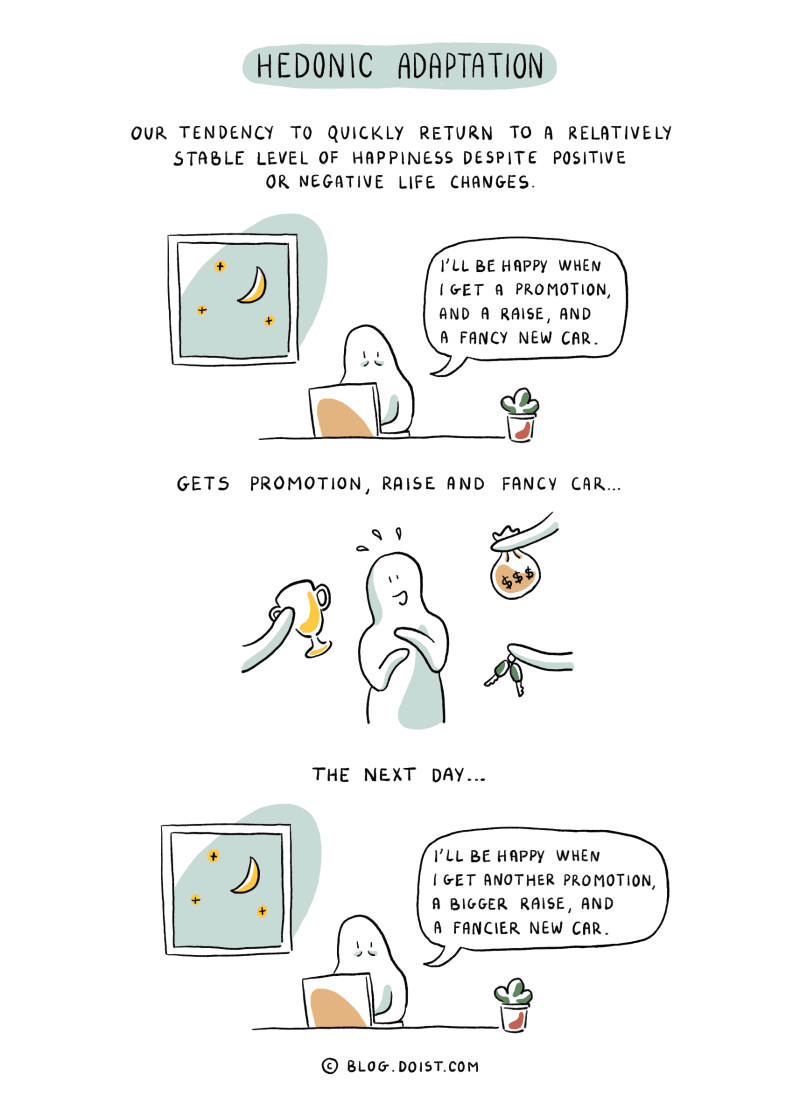
Hedonic adaptation is a cognitive bias that keeps us forever chasing the next thing.
An annual review is time to consider what you accomplished throughout the year. Give yourself permission to recognize and celebrate your wins –– the big ones and the small ones, the ones you intentionally aimed for and the ones you never expected. You may be surprised at what you discover when you take the time to look.
Unearth opportunities for improvement
Sometimes we avoid reflection because we’re afraid of what we’ll find. The uncomfortable feeling that we’ve wasted a year leads us to either dwell in regret or simply ignore the past altogether as we set starry-eyed goals for the new year. Neither impulse gives us the opportunity for honest self-reflection and growth.
Instead, take an objective look at your year. Dig through artifacts like an enthusiastic archeologist seeking to understand rather than judge. Use your annual review to get at the root of “why” and search for opportunities to do things differently in the year ahead.
When you review your year as a whole, seemingly unrelated parts of your life come into focus at once, enabling you to connect the dots.
You might discover that poor sleep sidelined your side project or digital detractions got in the way of family time. While facing our shortcomings head on isn’t easy, consider this reframe to make it easier: get curious, not critical.
Set better goals
We’re capable of running faster, writing better, working smarter, and anything else we set our minds to. We should set audacious goals that make us uncomfortable. But our ambitious goals should also be grounded in reality.
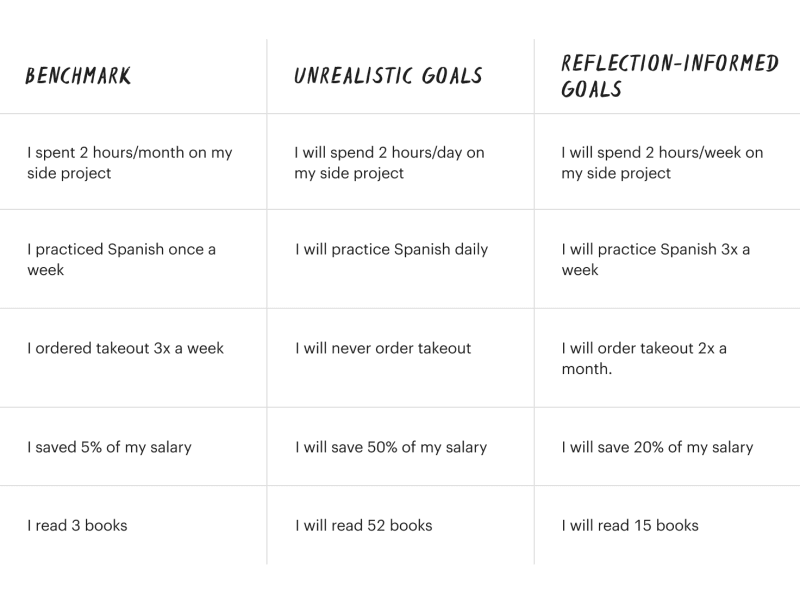
Set reflection-informed goals
Assessing the past year will help you take an honest look at your current benchmarks and inform your next targets. If you completed 50 workouts by the end of year, doubling that number for the new year is an ambitious goal worthy of pursuit. But aiming to workout daily and set a 365-day streak is probably an exercise in self-deception. An annual review helps us set resolutions we can actually reach by taking an ambitious, but realistic approach to goal-setting.
How to do an annual review
There’s no single right way to do an annual review. If you started the year with a set of concrete goals, you could review them one by one. If you’re a personal documentarian, you might review your year month-by-month, flipping chronologically through journal entries, notes, and snapshots on your camera roll. If you’re a master of the quantified self method, looking through your recorded numbers is a great strategy.
Here's how a few other annual review enthusiasts conduct their own year in reviews:
Anne-Laure Le Cunff, a productivity expert and the Founder of Ness Labs, conducts an annual review where she pulls out her highlights for the year, recounts challenges, and reflects on big life shifts and important learnings.
Justin Duke, a technologist, divided his review into sections like "Personal", "Professional", and "Content", further subdividing each section to discuss areas like his health, side-projects, and favorite books and music. He ends his refection with five goals for the year ahead.
David Perell, a writer and entrepreneur, penned a annual review that includes his highlights of the year, a reflection on his goals including a letter grade for each, goals for the year ahead, and further reflections on improvement, thing to celebrate, and open questions.
For many, the simplest strategy will be reviewing each area of your life that’s important to you. This is the method we recommend to get a holistic view of your year, from work to workouts to relationships and more. It’s the method we’ll walk you through in the rest of this guide.
Annual reviews are about reflection, but our memories are often faulty. Use the information and data at your disposal to look back on your year. Before diving into your annual review, here’s a quick summary of some of the information – or "artifacts" – you should have quick access to before you start digging into your year:
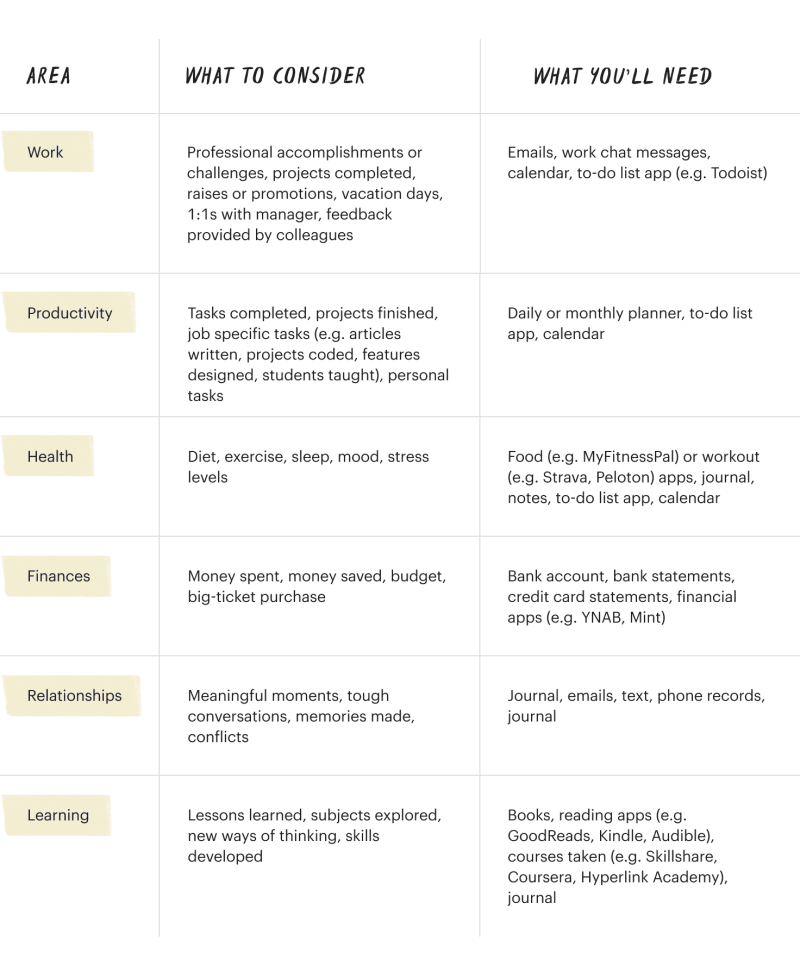
Everything you'll need for your annual review
If you don’t have some of the information above, don’t worry. An annual review is worth doing even without all the data above at your fingertips. As you go through, take note of the data you would have liked to have had access to and set up a system to start collecting it for next year. For example, if you’re having a hard time remembering what books you read this year, start keeping track of them with Goodreads. While you might not want to track absolutely everything, it’s worth setting up some systems to document areas of your life that you’d like to look back on.
The section ahead will walk you through the different areas of your life to review, what data you can uncover and reflect on, as well as questions to ask yourself as you revisit the past twelve months and look to the year ahead.
This will take a while, so set aside time during the end of the year or the early part of the new year to complete your annual review. Remember, life has different seasons. In one, you might be putting family above productivity or prioritizing finances over fun. While it’s worth assessing every area of your life, focus more time on the areas that are most important to you right now or that will be a priority in the new year.
Thinking is great, but writing is even better. Pull out a blank journal, a few sheets of loose paper, or go digital with a Google Doc, writing down notes to prompts and answers to questions as you work through each section. If you’re using the annual review Todoist template, try typing your answers in the comments section of each task.
Let’s dive in.
Work
Between racing to meet deadlines, busy periods at work, and growing professional responsibilities, a year goes by at falcon speed. Spend time reflecting on the work you did in between the madness. Contemplate whether you’re moving forward professionally or feeling stagnant in your job or career.
App callout note: 📈 What data you’ll need: Turn to...
Consider your favorite projects: Think back to the work you did in the past year and reflect on the assignments or projects that felt challenging but energizing. Jot down anything that comes to mind – from onboarding a new team member to serving on a committee unrelated to your core role. Look for common themes to the kind of work you find most gratifying. Write out the action items it might take to experience more of those high moments in the new year, including any obstacles you might need to break through.
Contemplate your biggest challenges: Consider any professional challenges that made you unhappy, stood between you and a career goal, or simply made your job harder. This could be anything from a strained work relationship to an abundance of busy work. Write down how you might minimize or eliminate these challenges in the new year. Don’t limit your scope of solutions – entertain the possibility of a new job or a new career path altogether.
Think about your professional growth: Our jobs (and by extension our days, weeks, and even years) get stale when we’re not moving. Reflect on new skills you picked up in the past year or opportunities you had to stretch beyond your previous capabilities. If things stayed the same, consider whether that works for you or if it’s time to try out something new.
Ask yourself these questions about your work:
In what moments did it feel like I was working within my zone of genius?
How did I expand my professional capabilities and skill set?
What professional relationships made an impact this year?
What did I work on this year that I’m the most proud of?
How did I provide support to my colleagues on the job?
What did I learn from any work mistakes I made?
Did I manage to find work-life balance?
Productivity
Working faster and checking off more tasks isn’t a worthwhile goal in itself. Instead, we should consider productivity in the context of what it allows us to do with our precious time and attention – from spending more time with our loved ones to getting a passion project off the ground. Use a portion of your annual review to consider how much you got done in the past year, both on a micro scale (daily) and macro scale (annual). Consider how effectively you spend your time and whether you’re making tangible progress in important areas of your life or falling prey to distractions.
App callout note: 📈 What data you’ll need: If you...

Track and review your productivity in apps like RescueTime
Consider your daily progress: Think about how much you’re getting done each day. Review any daily to-do lists you have on hand, whether they’re from earlier this year or just the other day. Pay attention to what you wrote down versus what you actually got done. Consider whether you’re structuring your day in a way that helps you focus on your priorities and move towards your goals. If not, take our quiz to find a productivity method that works for you – whether that’s time blocking, pomodoro, GTD, or something else entirely.
Review your overall productivity: The biggest indicator of productivity is what you actually got done. Take note of your biggest personal and professional projects. Write down the important things you got done this year. These could be big projects you launched at work, the effort you devoted to a side project, time dedicated to community organizing, or anything meaningful you accomplished and feel proud of.
Assess your digital distractions: Social media and online content can curtail our productivity and leave us with less time in a day. While Netflix and YouTube have their place in helping us unwind and enjoy entertainment, sometimes they distract and detract. Consider your time spent online over the last year. If your internet use veers toward excessive, think about the ways that time could be better spent. That doesn’t mean replacing your time on Twitter with work, but with activities that serve your bigger goals – whether that’s baking with your kids, cooking more at home, or creating the comic book you’ve been thinking about for years.
App callout note: Todoist Tip: View your completed tasks in...
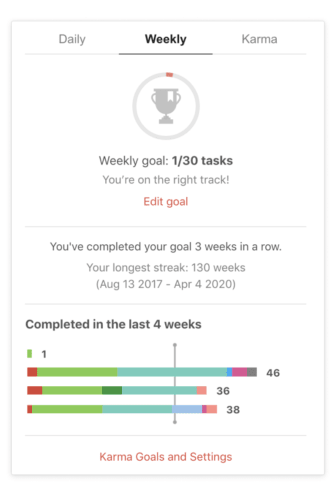
Review your daily and weekly productivity in Todoist
Ask yourself these questions about your productivity:
How much am I really getting done each day?
How satisfied am I with what I accomplished this year?
What factors may have contributed to accomplishing less than I wanted this year?
When am I the most productive? How can I create these conditions more often?
When am I least productive? How can I avoid these conditions more often?
Do I have a healthy relationship with social media and technology?
Health
Consider your overall wellbeing over the passing year – your physical, emotional, and mental health. Take a look at whether you ate foods that made you feel strong, healthy, and energized, or foods that left you feeling gross and depleted, mentally and physically. Examine your exercise and activity levels to see whether you made moving your body a priority. Evaluate your emotional and mental health, everything from your mood to the time you devoted to self-care.
App callout note: 📈 What data you’ll need: If you...
Account for your workouts: Review your workouts (or lack thereof). Highlight any PRs or activity results you’re proud of –– from trying out Yoga to going on a walk a few times a week. Try to spot any important trends, like working out less during a stressful month in your life or being more active during spring and summer. Use any new insights to inform the activity goals you set for the coming year. Think back to any injuries and whether you gave your body enough time to recuperate. Don’t forget to think about rest. Consider sleep levels and think about whether you’re waking up rested each day. Consider your nutrition: Look back at what you ate over the past year and assess whether what you’re consuming is making you feel your best. Consider everything from your caffeine consumption to your alcohol intake. Note down nutritious foods you want to add more of to your diet and write down areas of improvement.
Reflect on your mental health: Think about how you coped with the stresses of life over the past year. Note whether you felt any sadness, anxiety, or anger and how you dealt with those emotions in both healthy and counterproductive ways. Write down strategies to start or continue prioritizing your overall wellbeing in the coming year (e.g. journaling, meditation, therapy, exercise, etc).
Ask yourself these questions about health:
Overall, has my health improved, deteriorated, or stayed the same over the past year?
Were there stressful or challenging times over the year that impacted my health?
Am I adequately prioritizing healthy eating, exercise, and sleep?
What did I do for myself this year as self-care? Can I do more?
Did I devote adequate time to my religious and/or spiritual growth?
What kinds of activities left me feeling drained?
What kinds of activities reenergized me?
Finances
The value of money is what it buys us in the way of our needs, wants, experiences, security, and flexibility. Assess your financial progress over the last year as a whole, including any progress on big goals – whether that was paying off a portion of your credit card debt or saving enough to start a small business. Consider whether you’ve stuck to a strict budget or gone beyond your spending limits instead.
App callout note: 📈 What data you’ll need: Take a...
Look at where your money went: Beyond the big numbers, get into the details and recount precisely where your money went. Look into categories like bills, food, clothing, entertainment, child care, home, and everything else. Take the time to assess your biggest categories and see if there’s room for adjustments and reallocations.
Dig into how much you earned, spent, and saved: Look at the raw numbers –– note your income from all sources, the amount you spent, and any savings and/or debts. Consider whether these amounts are aligned with your financial goals. If not, jot down ideas for how you could be earning more, saving more, or spending less.
Consider the utility of your income: Note some of the important things you did with your income this year and how you’ll use your money in the coming year.
Ask yourself these questions about your finances:
Am I satisfied with how much I earned, spent, and saved?
Did I accomplish or miss any large financial goals?
What habits contributed to my financial success or failure?
Am I using my income to serve my other goals in life?
How much did I give to causes I care about? Am I happy with that number?
What is the top thing I can do next year to be financially successful?
Relationships
The people we spend time with and the relationships we forge make the year what it is. During your annual review, reflect on the relationships in your life – spouses and significant others, children, parents, siblings, friends, and more. Think back to memorable moments with friends and family – whether that’s birthday parties over Zoom or socially distanced walks in the park. Consider your most meaningful conversations, both the heart-warming ones and challenging ones. Consider how much time you spent with the people you love and whether you’re prioritizing their presence in your life. If you’re lacking connection and community in your life, consider how you might create them.
App callout note: 📈 What data you’ll need: Look back...
Consider the most important people in your life: Jot down the names of the people whose presence in your life you value, even if those relationships aren’t always easy. Consider whether you’ve spent enough time with them in the passing year, your favorite memories, biggest learnings, and ideas for spending more or better time with them in the new year. If relationships with any of these people are strained, think through the effort it might take to repair those bonds and whether it’s a worthwhile pursuit.
Think about how you support your loved ones: Relationships are a mutual dance of give and take. Consider how much you give. Write down the ways you’ve supported the people in your life and the times you may have fallen short. Contemplate how you could be doing more to show your loved ones you care – whether that’s thoughtful messages or arranging time to talk in between busy days and weeks.
Examine your overall connection to others: Consider whether you feel supported in life or may be lacking meaningful connection. If you want to build new relationships in the new year, write down or seek out strategies for finding friends, pursuing dating, or building community.
Ask yourself these questions about your friends, family, and relationships:
What relationships gave me energy?
What relationships zapped my energy?
Did I spend enough time with my loved ones?
What things may I have prioritized over my relationships? Are those things worth it?
What specific challenges did I encounter in my relationships?
What were the best moments with my friends and family in the last year?
Are there people I would like to get closer to in the new year?
What new relationships would I like to develop moving forward?
Learning
Life is better as an eternal student. Consider where your curiosities took you in the past year. Whether you were actually in school, took online courses, listened to podcasts, or read books, think about what you learned. Count your personal learnings about yourself and your life in what you learned over the last year. Self-inquiry is just as important as the things you pick up in textbooks.
App callout note: 📈 What data you’ll need: Look to...
Recount new knowledge or skills: Jot down the things you know now that you previously didn’t and what you can do now that you couldn’t before. Record learning milestones like building a personal website from scratch or cooking the perfect scalloped potatoes. List off the most impactful books or articles you read that expanded your mind, helped you think differently, or deepened your interest in a particular area. Write down any subjects or skills you want to prioritize learning over the next year.
Consider your ideal learning environments: In thinking about what you learned, consider how you learned too. Note how and when you did your best learning – whether that was taking a formal course or working one-on-one with a mentor. Use this information to plan how you’ll pick up new skills and knowledge in the new year.
Think about your personal life lessons: Write down your top personal lessons of the year – whether they were in the “relationship”, “work”, or “productivity” category. Experience is the greatest teacher; consider the experiences in your life that have helped shape you and shifted your perspectives this year.
Ask yourself these questions about your learning:
Were there competing priorities that prevented me from learning as much as I could?
What was the most personally impactful thing I learned this year?
How and when did I do my best learning over the last year?
What skill should I focus on developing in the new year?
How am I a different person now compared to last year?
If you’re fortunate enough to have a quiet day or two between the end of this year and the start of the next one, take time to unearth and examine the work, productivity, health, finances, relationship, and learning you’ve done over the past 365 days.
Before forging head-first into the future, take time to reflect on the past.
In reflecting upon the year, do your best to examine and question, not dwell. You may have fallen short of your goals or experienced challenges that made for a hard year, but chances are you accomplished more than you think you did. No matter what you unearth in your annual review, you will have learned more about yourself and what you want in life and that counts for a lot. Reflect on the year gone by so you can move forward with renewed energy and optimism for all that’s to come.
App callout note: Use our annual review Todoist template to...

Fadeke Adegbuyi
Fadeke is a writer and marketer. She's passionate about telling stories of better ways to live and work.
