
How to Declutter Your Digital Life & Reclaim Your Attention
Systematically reorganize your files, social media, email, and more and create more mental space for what's important to you
Our digital lives today are seemingly limitless worlds of people to follow, music to stream, articles to read, and so on. The flip side of all that digital abundance is that we often feel overwhelmed, exhausted, and burned out from it all.
This double-edged sword was brought home for me recently after reading three books, each about building one’s life around less: Cal Newport’s Digital Minimalism: Choosing a Focused Life in a Noisy World, Jenny O’Dell’s How to Do Nothing: Resisting the Attention Economy, and Svend Brinkmann’s Joy of Missing Out: The Art of Self-Restraint in the Age of Excess.
In Joy of Missing Out, Brinkmann, a philosopher, argues that the path to happiness is not in acquiring more but wanting less. Rather than achieving this through sheer self-control, he suggests “constructing an environment that does not tempt you all the time.”
In How to Do Nothing O’Dell, an artist and writer, questions our society's definition of what counts as "productive":
[W]e inhabit a culture that privileges novelty and growth over the cyclical and the regenerative. Our very idea of productivity is premised on the idea of producing something new, whereas we do not tend to see maintenance and care as productive in the same way.
And Newport, a computer science professor, in Digital Minimalism, offers a blueprint for organizing our technology around what we most value, and minimizing the rest. His influence in writing the book came out of notes he received from readers of his earlier book, Deep Work: Rules for Focused Success in a Distracted World, about their struggles with focus:
It’s not that any one app or website was particularly bad when considered in isolation. As many people clarified, the issue was the overall impact of having so many different shiny baubles pulling so insistently at their attention and manipulating their mood. Their problem with this frenzied activity is less about its details than the fact that it’s increasingly beyond their control.
App callout note: Learn more about what Cal Newport can...
What becomes clear from reading these books is that, in an age of constant connectivity and never ending floods of information, it takes work to focus on what truly matters to you.
This realization is what inspired me to do a digital declutter. A digital declutter is an audit of one’s entire digital life, followed by removing or reorganizing everything into a simpler, more secure, and more backed up system.
The average American has about 83 bookmarked websites, 7 tabs or browsers open, 582 saved cellphone photos, and 13 unused apps, according to a survey by Summit Hosting.
In my own digital declutter, I discovered:
Dozens of accounts I never log into, like closed credit cards and unused apps
60 painfully uncurated Facebook photo albums
An inbox 8,000 emails deep, with several hundred unread
Digital clutter doesn’t take up physical space (except maybe at a data center in Las Vegas), but it takes up significant space in our heads. A cluttered environment gives the feeling that various things are competing for our attention, which can be mentally taxing and stressful. This makes it harder to focus and reflect, think creatively, and make important decisions.
Pruning distracting objects, limiting the “noise” of social media, and deleting reminders of unfinished projects can help you direct what you pay attention to.
Broadly, the steps to decluttering are:
Do an overview of all things digital (files, folders, accounts, etc.).
Delete anything you don’t need.
Reorganize what’s left.
Maintain the decluttered life with simple and consistent habits.
Be patient with yourself on this project — it’s all about having a framework, with tasks you can slowly chip away at instead of finishing right away and ultimately making things easier for yourself.
Declutter documents
College papers, old banks statements, scripts from attempted screenplays — what random documents are you still hanging on to? Here’s how to set up a solid backup system, and an organized way to access files going forward:
Store and backup everything: Before you do anything else, make sure your files are backed up. Opt for one hardware and one cloud storage solution from these options: Computer/internal hard drive External hard driveOnline backup services: service that copies files to an offsite server (e.g. iDrive, Carbonite, or Backblaze) Online syncing services: syncs files between a Cloud service and various devices (e.g. Dropbox, Tresorit, Box, Google Drive, iCloud): Check out Tom’s Guide or How to Geek for more.
“Audit” your folders and files: Do a simple sweep of folders and files to see where they’re saved and how they’re organized. For example, some of my files are on my computer (synced to Dropbox), all are synced on Dropbox’s cloud, and some are on Google Drive.
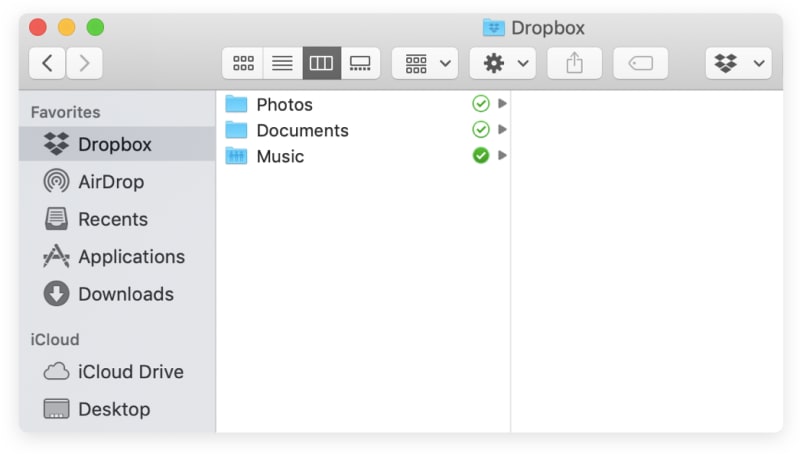
Use a simple hierarchy to organize your folder system.
Delete files you no longer want: Delete files you no longer want, including duplicates. If the idea of digging through some or all of your files seems overwhelming, move them to a folder called “To File,” and go through them gradually.
Organize a folder system: Now it’s time to re-organize your folder system, using a simple hierarchy. It can help to draw out your folder hierarchy on paper. If you have several documents of a certain type, make a folder for them, for example “Taxes” or “Scripts.” If it helps, break down your categories further with sub-folders. Files are easiest to find if your organization system isn’t too complicated. Zapier has more good suggestions. Because I’m a freelancer and use my computer for work and my personal life, my top-level folders are: “Personal” and “Work,” and then I have sub-folders. For example in the Work folder, sub-folders include “Applications,” Clients,” and “Website.”
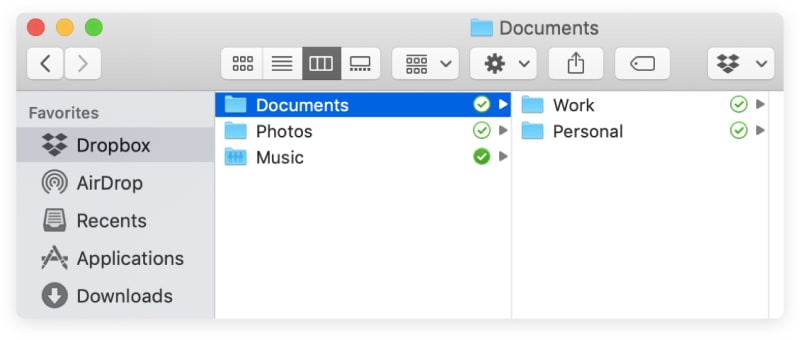
If you use your computer for work, you can organize document files by creating a “personal” and “work” top-level folders.
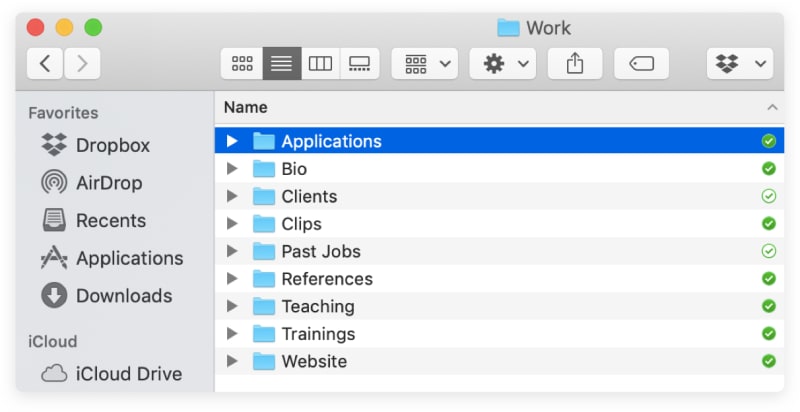
Files are easiest to find if your hierarchy is simple, intuitive, and mimics how you actually work.
Move everything off your desktop: Saving files to your computer’s desktop is the equivalent of scattering a pile of papers over your physical desk, making it harder to find what you need when you need it. Move files off the desktop to a folder, or delete them. Motivate yourself to keep your desktop clear by adding a cool wallpaper, like a photo of a place you love or family or friends.
Delete downloads and temporary files: Move or delete downloads and temporary files to clear up space.
Use file naming conventions: Settle on a standard file naming convention so everything is easy to find.
Save files to their proper folder: Going forward, always save files into their relevant folder, so they’re easy to find and don’t end up lost.
Declutter photos
If you’re like I was, with thousands of photos stored in various places, here’s how to get things under control:
Store and backup photos: Like documents, backup photos on a physical device and with a cloud storage system. Consider an external hard drive if you have a large photo library.
Organize a folder system: Organize photos under a Photos folder. One approach to sub-folders is to organize by year and then by the event or place. (I do a hybrid of this approach, using specific photos for trips and filing most other photos under the year I took them.)
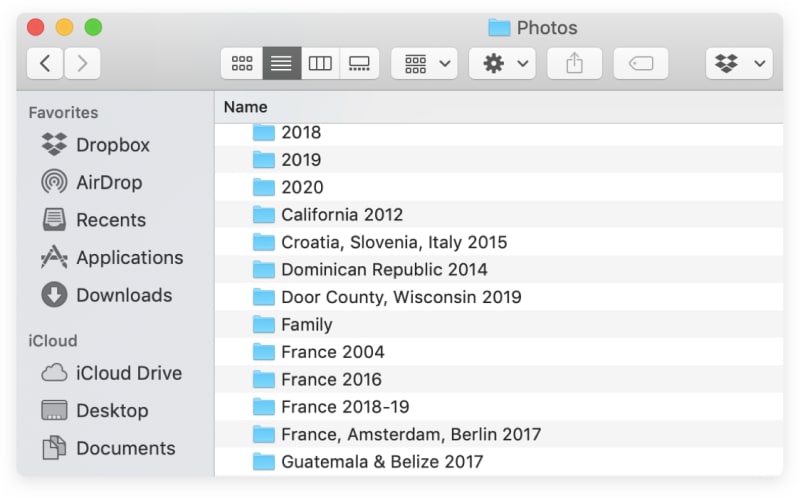
One way to organize a photos folder
File or delete photos: Depending on how many photos you have, you may want to break the task of organizing and deleting them. Listen to a good podcast while you categorize your digital photo archive.
Move photos off of social media: If Facebook is your default photo backup storage solution, you may want to change that, for privacy and other reasons. If you have photos from the app that you want to hang on to, go to Photos, then Albums, click on the album, click on the gear, and click “download album.” (Unfortunately, the photo resolution may not be as good as the original). To remove the album from Facebook, click on the gear, and click “delete.”
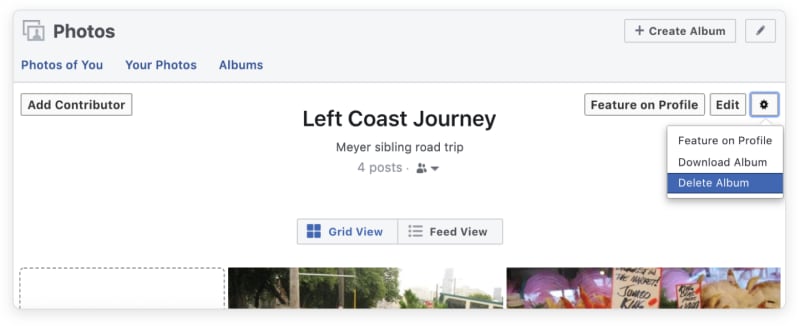
You can download or delete Facebook albums.
Move photos off your smartphone: To free up space and keep your photos in one place, try to move them off of your smartphone and onto your computer, either through syncing to a cloud service like iCloud Photos or Google Photos, or connecting your phone to your computer.
Declutter music files and streaming services
Here’s what to do about all of those music files:
Store and backup your music: Similar to your documents and photos, use one physical and one cloud option. Consider an external hard drive if you have a large music library.
Organize a folder system: Organize all music files under a folder called “Music.” One folder structure recommended by Tech Hive is Music > Artist > Release Name > Audio & Artwork files. (Tech Hive recommends putting compilations in a “Various Artists” sub-folder.)
File music into your new folders and delete duplicate tracks: Again, find another good podcast — or an album — to keep you occupied as you spend time filing. 😀
Name unnamed music files: Rename files called “unknown name” or “unknown track,” either manually or with MusicBrainz Picard, an automatic app that detects music meta-data.
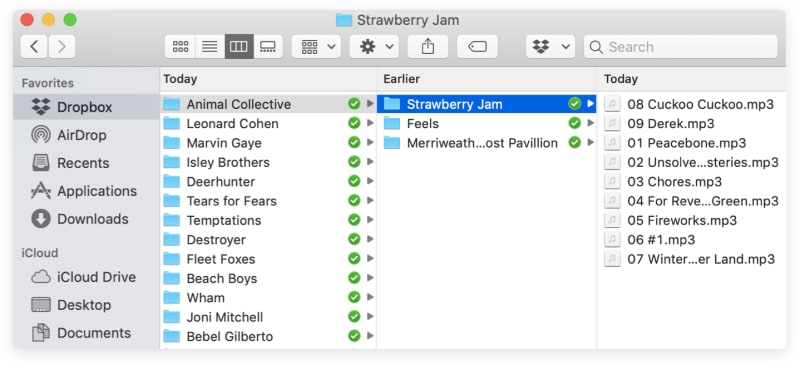
Music files, organized by artist, album, and track name
Organize streaming service music into playlists: Many of us primarily listen to music through streaming apps like Spotify. Use these services’ playlist function to organize your songs by era, genre, artist, or whatever you like!
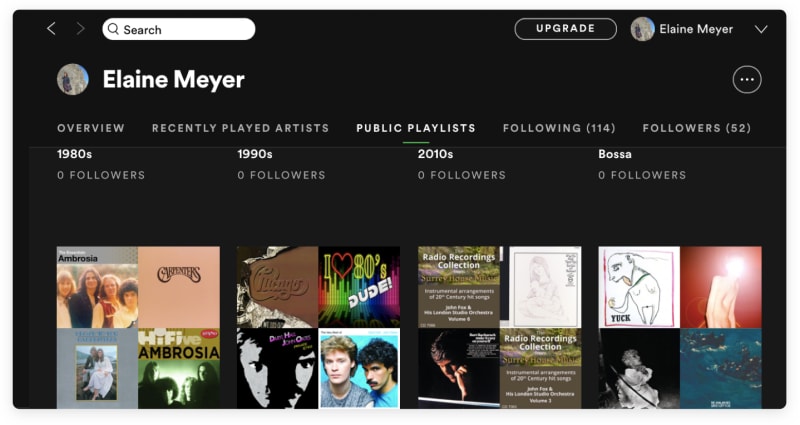
Create playlists on your favorite streaming service, like Spotify, to keep your music organized.
Declutter email
Email is especially difficult to get a handle on. But it is possible to make it less painful, by keeping it organized and spending less time checking it. Here’s how:
Clear out your inbox
Declare inbox bankruptcy: If your inbox is enormous like mine was, accept you won’t read all of those emails, and declare "inbox bankruptcy". This means archiving all messages, so you no longer see a full inbox when you open email. To do this in Gmail, check “Select all,” then, click “Select all [number of your emails] conversations in ‘Inbox,’” then click on the downward-pointing arrow to “Archive.”

Declare inbox bankruptcy in Gmail by checking all conversations and moving them out of the inbox.
Unsubscribe: Realistically, we only have a finite amount of time to read email, and that’s okay. If you no longer want to receive emails from a product, campaign, organization, etc., just unsubscribe. You can do this yourself (I unsubscribe as emails come in) or use an email unsubscribe service. Just make sure to do your research, as some of these products have had privacy and security issues. I use a few criteria to decide when to unsubscribe: I never read their emails, what they send is no longer relevant, they sell products (too tempting), or I get too many emails from them. Be honest with yourself about what you’ll actually open and read! It may seem harmless to hang onto a subscription you might possibly open one day, but each new unread adds to the mental weight of digital clutter.
Reorganize your email
Create and use folders or labels (if you want). Some people think using folders for email is a waste of time. After all, there’s search. Do what works for you, but, if like me you find folders — or labels, as they’re called in Gmail — useful, create categories that correspond to subjects you get emails about, like work, education, hobbies, travel, and finance.
Practice good email habits
Stop using email as your default to-do list: Try to move away from using email as your default to-do list by using this Inbox Zero strategy: respond to or forward emails you can take care of right away, and add emails that are more involved as a task on your to-do list that you get to later. Then, archive the email so it’s out of your inbox. I add emails to my Todoist as tasks using the plug-in for Gmail.
App callout note: 💡Tip: Start turning your emails into Todoist...
Add your emails as tasks to Todoist
Check email periodically, not constantly: Check emails in designated blocks of time throughout the day, rather than keeping your email open all the time. This way you can concentrate and focus on deep work. As Cal Newport says: “If I organize my life in such a way that I get lots of long, consecutive, uninterrupted time-chunks, I can write novels. [If I instead get interrupted a lot] what replaces it? Instead of a novel that will be around for a long time … there is a bunch of e-mail messages that I have sent out to individual persons.”
Create filters: Email clients have filters or rules that allow you to automatically file emails to a folder, skip your inbox, never go to spam, etc. Use filters to help you time block and task batch how you respond to email. For example, if you want to check emails relating to new job opportunities in one block of time, filter job notification emails to skip the inbox and go directly to a folder, and then check that folder at a particular time during the day or week.
Email less: The more email you send, the more email you get. Some emails simply don’t need a response, or as rapid a response as you think. And some issues are easier to resolve over the phone or in a meeting than in an email. Build a reputation as someone who responds to emails well, rather than quickly.
Declutter social media
Social media has become essential for many of us. While Facebook, Instagram, Twitter, and other tools help us stay connected, an over-reliance on them can lead to anxiety, distraction, and a feeling of overwhelm that can sometimes become paralyzing. “Humans are not wired to be constantly wired,” as Newport says.
Here are a few tips to strike a balance in how you use social media:
Take a break from social media
Take a social media “fast" or break: If you feel bad after using social media, try a social media fast — going offline for a period of time, even if just a day or two — or significantly limiting how much time you spend on social media.
Notice changes during your fast: While you’re off social media, notice how you feel. Are you thinking differently? Are you reading more? Focusing better? What do you like about being off of social media, and what do you miss?
Reorganize social media
Based on your “fast” experience, reorganize your social media so you’re using it in ways that feel better:
Use as few social media apps as possible: “It takes a lot of brainspace to check and be active on Facebook, Twitter, LinkedIn, Instagram, Snapchat, and more all in the same day,” says Brett McKay of Art of Manliness, who suggests regularly using just two social media apps.
Use lists: You can create lists based on subject areas or groups of friends for Facebook and Twitter to stay up-to-date on certain subjects or people without having to scroll through an unwieldy feed. On Instagram, you can “mute” seeing stories from certain people, check who you interact with most and least, and create a close friends list for sharing your stories.
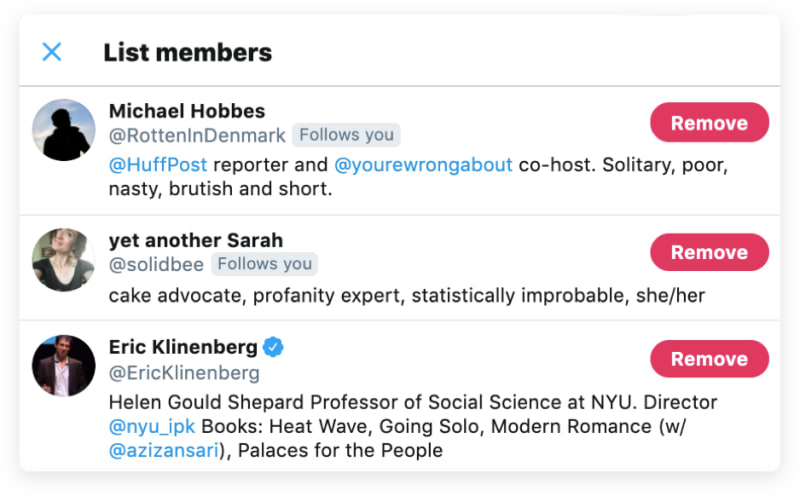
Lists on Twitter can help you focus on a certain subject area.
Reduce who you follow or are friends with: “Hide,” unfollow, or even unfriend people on social media.
Bookmark specific pages: If you mainly use Facebook to stay in the loop about upcoming events, or a few professional groups, Newport suggests bookmarking those pages and just going to them directly, to avoid the feed.
“Eradicate” your feed: You can also avoid getting sucked into Facebook’s feed by blocking it with the News Feed Eradicator plugin for Chrome or Mozilla, which replaces it with an inspiring quote.
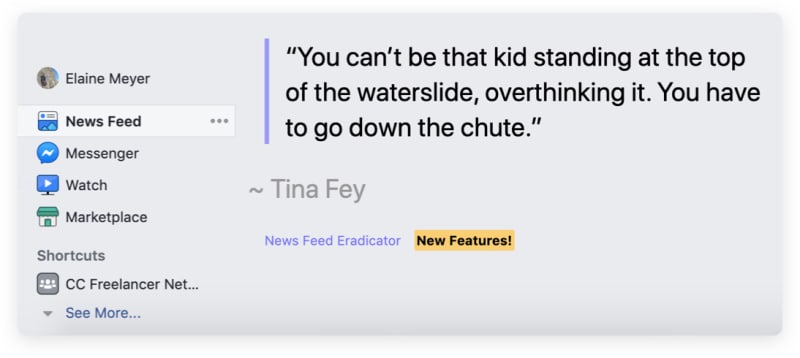
The News Feed Eradicator plug-in lets you block your news feed on Facebook
Practice good social media habits
There are clear tradeoffs to using social media, as John Carmack realized after he did a “no screen time day”:
Here are ways to moderate your use going forward:
Remove social media apps from your phone: It’s easier to avoid mindless scrolling if you don’t have social media apps on your phone.
Schedule time to go on social media: If you want or need to use social media, Newport suggests scheduling time to use it. This flips on its head the way we usually use these tools, to fill unscheduled time. This method helps you set limits for yourself.
Mute notifications: Silencing the dings on your device will help you avoid getting sucked into a digital vortex.
Engage more, like less: Newport points out that “liking” is a shallow and passive interaction. Instead, try to engage with genuinely interesting content. Commenting on posts where you actually have something to say is a more active way to use social media.
Declutter news
I heard an analogy recently that getting information via social media would be like your school teacher standing in front of the classroom and saying one line from the lesson of each subject — something about the Civil War, the theory of relativity, geometric proofs, and the Lost Generation novelists. It’s difficult to process complex information without context.
But it’s not just social media that makes consuming news challenging. The news today is stressful, and there’s a lot of uncertainty in the world. Supposedly, Gandhi didn’t read the news for three years, starting at the age of 37, because “the tumultuous state of world affairs caused him more confusion than his own inner unrest.”
But you don’t have to go that far to get more of a handle on how you consume news:
Reorganize your news
Group your favorite news sources: There are more news sources than ever, both of low and incredibly high quality. Try to have your go-to news sources somewhere: in a bookmark folder on your web browser, on a news aggregator, such as Apple’s News app or various news apps available on Android, or on an RSS reader like Feed.ly.
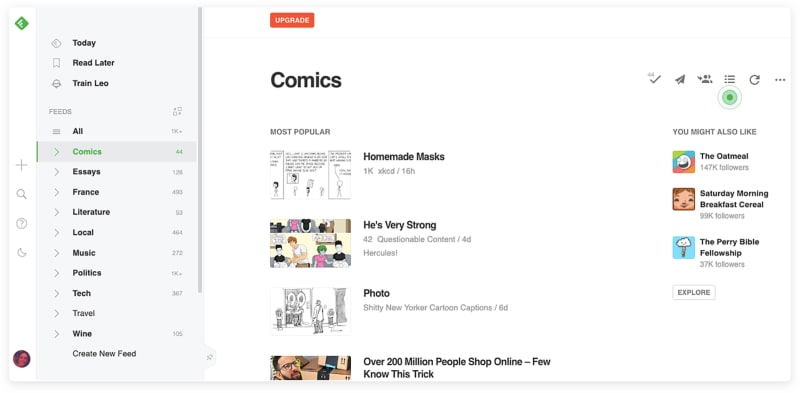
Use an RSS like Feed.ly to manage how you read news.
Save articles you want to read for later: Use a “read-it-later” app like Pocket or Instapaper or try OneTab, which allows you to convert all of your tab items into a list, or Todoist’s Chrome extension, which makes it easy to save web pages to a “Read Later” project. This is great for those of us who have a “tab” problem (see below).

Save your websites as tasks to a “To Read” folder using the Todoist Chrome extension, with a link right back to the original URL.
App callout note: 💡Tip: Find out how to easily save...
Practice good news habits
Prune your news feeds: Unsubscribe or otherwise “prune” your news feed when you need.
Check news at particular times of day: Read, listen, or watch news at particular times of the day, and not intermittently. Limit your use of social media for news. While many of us now access our news through social media, some even making it their primary news source, most of us also say social media makes news worse. Social media is an easy way to get information, but it can lead to information overload and getting the most sensational bits of a story without context.
Minimize tabs: To avoid being overwhelmed by too many tabs, add articles you want to your read-it-later app like Instapaper, Pocket, OneTab, or use Todoist’s Chrome Extension.
Declutter apps
The number of digital interfaces people deal with in a given day has become enormous. The average number of apps used per business increased by 43% in the last four years alone, according to a report by Okta. At the same time, people have a glut of apps. On computers, at least 30% of apps installed were never used, according to a study by Kaspersky.
“Since each app is a new interface we need to pay attention to, over time our work lives have gotten increasingly chaotic,” as Dropbox reveals in their workplace report. Here are tips for minimizing the number of apps you have to deal with:
Delete unused apps: Delete any apps you haven’t used recently from your smartphone and your computer. Just as you can always resubscribe to an email newsletter or re-join Facebook, you can always download an app again.
Use one app for each purpose: Find your favorite app for each purpose — read-it-later, to-do list, podcast, etc. If you have more than one for the same purpose, move the information from the app you’ve decided not to use to the one you’re going to use (e.g. podcast subscriptions, tasks lists). Delete the unnecessary app.
Organize apps on your smartphone: Sort your apps into folders and move the most addictive apps on the second or third screen of your smartphone. Making it just slightly harder to access an app gives you a moment to think about whether you really want to say, check your email, right now.
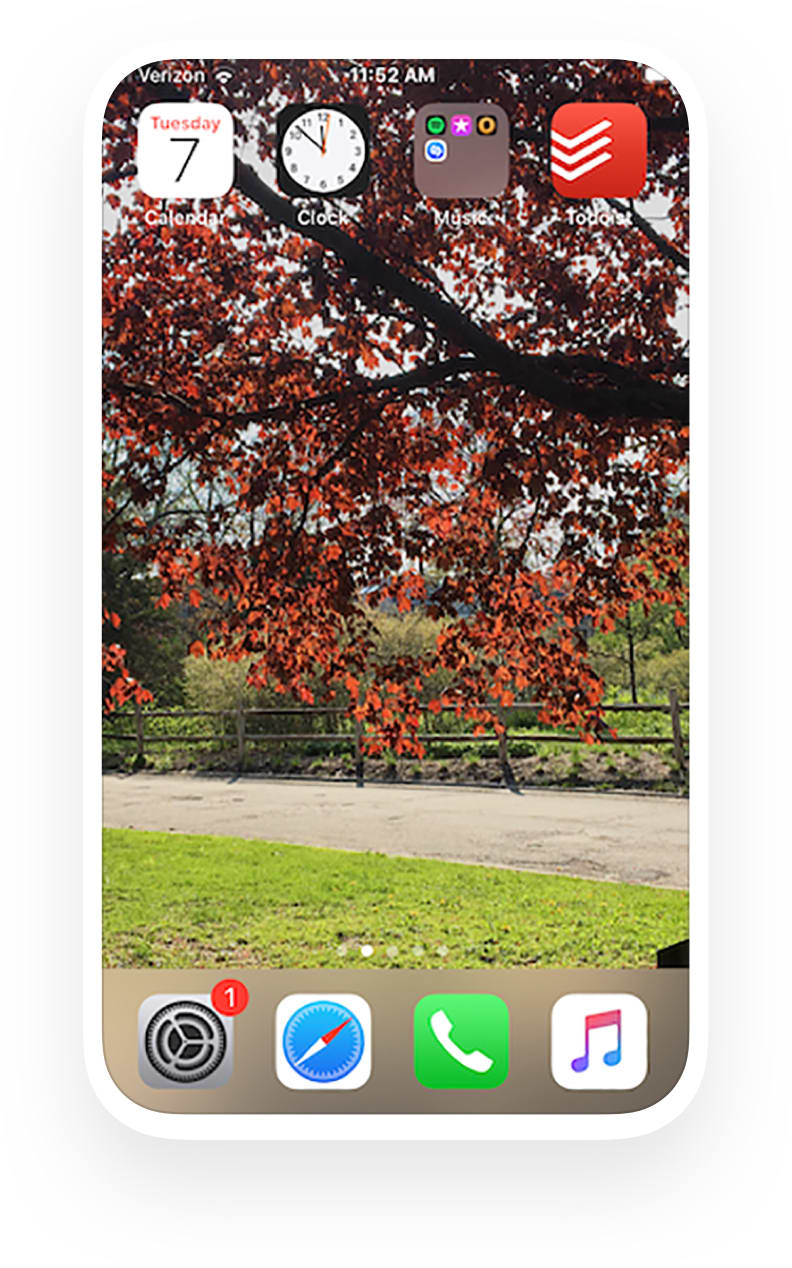
Keep just a few apps on the first screen of your smartphone and other, more addictive apps on the following screen(s).
Move files off your smartphone: Move old notes and voice memos off your computer and into appropriate folders on your computer. For example, I have a note where I write down my favorite quotes. I move these to my computer from time to time and then delete them in the note.
Turn off notifications: Follow instructions for turning off notifications on iPhone or Android.
Declutter passwords & accounts
This is my least favorite area, because I’ve put off setting up a secure and efficient password management system for a long time. But the security risks created by digital clutter are real. Common vulnerabilities, like using the same password for multiple accounts and using easy-to-guess passwords, are hard to keep track of because of all of the user accounts we have to create. Here’s how to deal with this password clutter:
Update insecure or easy passwords for highly sensitive accounts, like your bank accounts and health insurance.
Move all passwords to a password manager service like BitWarden, 1Password, or Dashlane. Wirecutter and PC Mag have helpful reviews on this. Accessed via a master password, these services create and store unique and secure passwords while letting you automatically log into accounts you use.
Delete accounts you don’t use: As you’re transferring accounts to a password manager, delete accounts you no longer use.
Keep your master password on paper: Keep your master password on a piece of paper in case your password manager system is somehow compromised or you simply forget it.
Use two-factor authentication: Two-factor authentication is annoying, but it truly adds an extra layer of protection.
App callout note: For more on staying safe and secure...
Like cleaning your home, decluttering has its tedious moments. I definitely advise breaking it up so you don’t get overwhelmed. Use temptation bundling to your advantage and listen to your favorite soundtracks and keep your best snacks on hand. Hopefully, as you work on it, you’ll feel good about having more of a handle on your digital world. The point is not to have a perfect system, or even necessarily to finish, but rather to start reclaiming your mental space by getting a handle on your digital ones.
As Newport says in Digital Minimalism: “To reestablish control, we need to move beyond tweaks and instead rebuild our relationship with technology from scratch, using our deeply held values as a foundation.”
Share your favorite methods for digitally decluttering in the comments, and good luck!
App callout note: Take more inspiration from Marie Kondo and...

Elaine Meyer
Elaine is a writer, editor, and content strategist who is interested in tech, health, and the future of work.