
7 Real-Life Todoist Setups to Steal
Copy the powerful workflows of productivity experts

A frictionless productivity workflow can move even the most frazzled of us from overwhelmed and unfocused to calm and ready to tackle our biggest plans. But finding that workflow can be anything but a walk in the park.
Shiny new tools with flashy ads make it easy to think that it’s the technology that is the culprit — if we could just pick the perfect app or notebook, we’d be successful and stress-free. But, just as buying the perfect tennis racket and standing on a well-groomed tennis court won’t turn us into Roger Federer, tools alone won’t make us more productive.
Here’s where methodology needs to come in. We’ve rounded up seven of the most useful, real-life Todoist setups — all of which will help you power up your workflows.
Before you begin:
Jot down your current frustrations — like needing a better way to sort and track article pitches or never finishing everything on your list
Start small, using one workflow at a time to try it out
Use different workflows for different types of projects — a simple list might work for Father’s Day shopping, but a shared calendar might work better for team planning
Find integrations and automations that make the work even smoother
If you can’t seem to find your flow …
mix up time blocking, calendar syncing, and weekly reviews.
Todoist’s social media extraordinaire, Jackie O., has found a way to schedule her week that helps her get deep work done, complete day-to-day must-dos, and also take healthy breaks. It all comes down to her Schedule project which helps her get an all-important overview of her week.

Jackie lays out the week ahead with a calendar project in board view.
Begin with a weekly schedule in board view
Jackie realized that board view would be the perfect way to visualize her week ahead, so she has one section for each weekday. She’s able to get the bird’s eye view of what’s to come, plan for the tasks in her queue, and also block out time for deep work, breaks, and getting things done.
Use uncompletable tasks for nonnegotiables
To ensure she aligns the way she spends her work time with her big goals — both work and self-care — she denotes chunks of time in her day with uncompletable tasks. You simply put an asterisk and space (* ) at the beginning of any task.
She begins her day with communication time, takes a break for lunch, and blocks a large chunk of time for focused and creative work. From there she slots in the completable tasks she actually needs to check off her list, like writing social copy for upcoming campaigns, brainstorming for future posts, and updating specs for major projects.
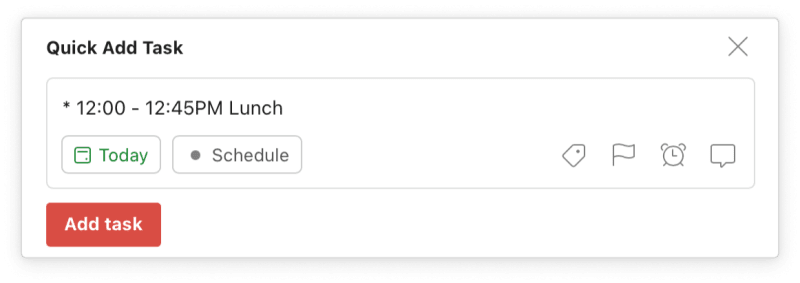
Lunch is an uncompletable task, since it has an asterisk and space (* ) at the beginning.
Add reminders for breaks
Since Jackie finds that she’s terrible about leaving her desk in the afternoon, she uses reminders so she can’t forget. Todoist gives her a gentle nudge to get out the door at 3:30 PM every day — which happens to be when the day is glowing in Southern California!
Pull in meetings with a calendar sync
Another way she manages to keep track of her time is an Upcoming section, that automatically pulls in the day and time of her Google Calendar events. This way, she sees what’s to come so she can plan for all-hands meetings, one-on-ones, and more.
Complete a weekly review
Unsurprisingly, the most important part of her entire workflow is her weekly review, each Friday. She plans her week ahead, adds the uncompletable tasks to each day, and fills in her completable tasks in the gaps.
She’s found that filling in her time blocks with the actual tasks she needs to get done gives her an idea of how long to spend on each. And remember that Upcoming section with the calendar sync? She’s also able to slot in the meetings that could push her schedule around. All of which helps her stick to her mandatory deep work time.
App callout note: Tip: Learn how fitness influencer Meg “Squats”...
If you're having a hard time sticking to a routine …
try combining task batching and day theming via daily and weekly rituals.
Gabriela Brasil, a digital productivity and organization entrepreneur and Todoist ambassador, has a process to create daily, weekly, monthly, and seasonal rituals. These help her plan everything out with specific, recurring actions — each with time blocked in her schedule.

Gabriela keeps all her rituals, from the daily to the quarterly, in a single project in board view.
Start with day theming
She finds day theming — picking a day of the week to batch types of work — makes figuring out what to do next effortless. She knows where she’ll be spending her time for the day ahead. And when things pop up, she knows where to schedule them. Receive a bill? Financial tasks are for Wednesdays. Need to schedule a meeting? Those are all on Thursdays.
Label everything
She doubles down on this method by using labels (now available on the Free plan). First, she adds labels to every task she has on her list. Then, when it’s time for her to start her workday, she simply searches for the tasks that have both the @daily-routine and @office labels and begins.

Gabriela finds the right task quickly by adding labels like @daily-routine and @office.
Do daily, weekly, and monthly reviews
But her most important rituals are her reviews. She always blocks out time, usually half an hour, to look back on her day, week, or month and rearrange. Todoist’s activity log (now available on the Free plan, too) is a great way to look back at what you’ve accomplished. But reviews aren’t just a retrospective, they allow you to prep for what’s to come.
Gabriela's biggest review and planning tip? Start with the macro, rather than the micro view. She likes to plan her year before her month, her month before her week, and her week before her day. That way, she keeps an eye on her biggest dreams and keeps track of the little things that will lead her there.
If you have too many tasks due today ...
ruthlessly prioritize your day to get your big Today view down to a manageable checklist.
Carl Pullein, productivity and time management coach and Todoist ambassador, turned his nearly endless list of to-dos into what was actually possible for the day ahead. He uses the same method to help his clients get honest with themselves and learn what they really can (and should) get done in a single day.
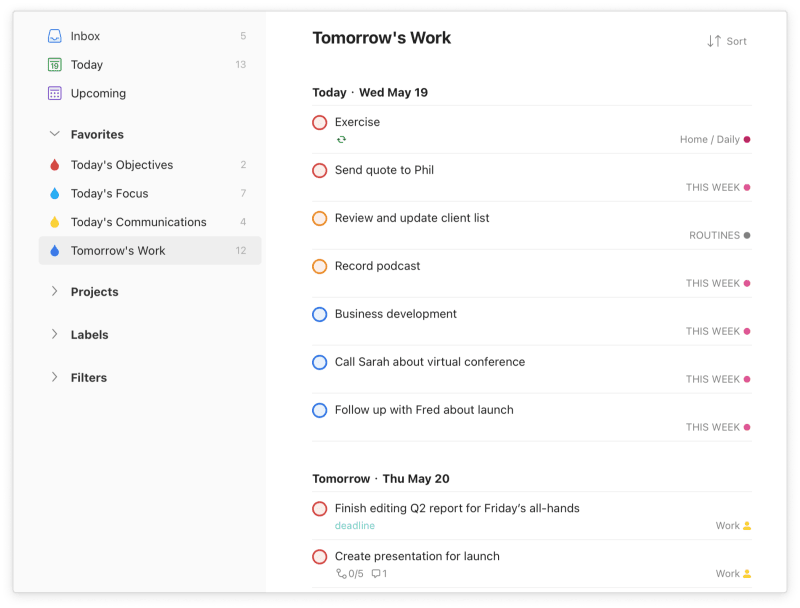
Carl uses a filter to see the work he has due tomorrow (and what he needs to reschedule from today).
Set priority labels
To start, he prioritizes each and every task on his list for the days ahead. He’s found that in a typical day, he feels best with two top priority tasks (p1). From there, he adds lower priority levels (p2 and p3) to eight more tasks, as he’s found that ten tasks are the number of tasks he can actually tackle in a day.
Add in communication labels
For the myriad of little must-do tasks that some workers need to handle, he suggests adding labels like @calls and @emails, to make sure nothing slips through the cracks. This way, those daily details get handled without having your Today view become overwhelming.
Create filters, and add them to favorites
To further ensure that the day’s list doesn’t get out of hand, he breaks tasks due today down with saved and favorited filters.
Today’s objectives: a filter with the top two tasks due today (today & p1)
Today’s focus: a filter for only the top 10 tasks (today & !p4)
Today’s communications: a filter and labels with all calls and emails to follow up on (today & (@calls|@emails)
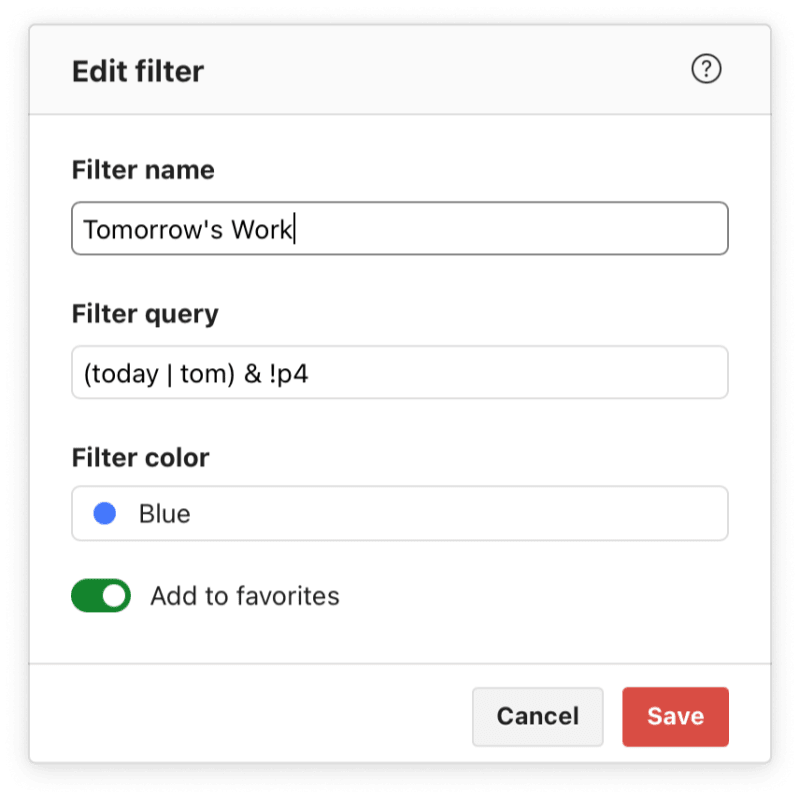
Carl also has a filter called Tomorrow's Work, showing tasks due today and tomorrow (today | tom) that are not low priority (!p4).
Review and plan
Notice a pattern? Reviewing and planning is nearly as important as checking things off! Carl makes sure he doesn’t wake up to a long list of tasks for his day ahead by using yet another filter: This time for the next two days and using that view to start again from step one (setting priority levels). By making sure he only wakes up to two p1 tasks and eight more p2 and p3 tasks, he knows he can always accomplish every item the next day.
If you can’t keep your team on the same page …
create a team calendar and pipeline to smoothly move everything through a process.
Team workflows can be tricky to make click. Becky and Fadeke, productivity experts and Todoist content team leads, teamed up to combine all their learnings into a workflow that got the entire team aligned.
Create a calendar using board view
Like Jackie, the content team at Todoist uses a dedicated Content calendar project in board view to visually understand what’s up next on the blog. However, instead of sections for each day, Becky creates a section for each week.
Each blog on the calendar gets its own task, complete with labels that note who the editor is and due dates to keep things scheduled. Teammates chat about timing in the comments if things (inevitably) need to shift.
App callout note: Tip: You can also use board view...

Each month gets its own section, complete with tasks with recurring dates and plenty of comments.
Move projects through a visual pipeline
Content for Ambition & Balance moves through a variety of steps before a post even makes it to that content calendar — from pitches and outlines to illustrations and final edits before publication. Becky and Fadeke rely on a Kanban board to move each article along, identify roadblocks, and stay in the loop on progress.
The Content pipeline project is also set up in board view, with sections ranging from Backlog all the way to Published. Sub-tasks for smaller steps, comments for discussions between writers and editors, and file uploads for actual draft shares are the indispensable features that make the flow possible.
P.S. Comments and file uploads are now available on the Free plan, too!

This visual productivity workflow provides an overview of every blog, from planning to publication, so nothing gets lost in the shuffle.
Create DIY templates for recurring projects
Many team projects — like blogs — follow the same steps each time they occur. For the content team, templates are huge time savers. Becky’s blog template allows the team to do the same thing over and over again without ever missing a step, which ensures blogs publish on time and with every edit, alt-tag, and label in the right place.
Custom templates also make it a breeze to onboard new people. They act as documentation that actually walks newcomers through the process step by step. Add in uncompletable tasks with important details or documents and you make sure teammates are all on the same page from day one!
Coordinate with other teams with comments and files
A work project that doesn’t touch multiple teams is rare — especially when creating marketing content! Becky and Fadeke have created a Blog design requests project. The project is shared with members of the design team and content team, to coordinate illustrations and images for each blog. Image requests are further broken down into sub-tasks for each image needed, complete with comments about sizing, direction, and timing.
Teammates can assign tasks and due dates to one another, share drafts and image files, and stay in the know with notifications.

Becky uses task details, due dates, links, and a thorough comment to request supporting graphics for a blog.
App callout note: Tip: Use uncompletable tasks to add important...
If your tasks are scattered everywhere …
make Todoist your one source of truth with automation.
I started the year with tasks everywhere — three different email accounts, text reminders, and notifications from the myriad of apps I use on a daily basis for work and fun. It wasn’t possible to keep on top of everything.
Luckily, Todoist integrates with quite a few other tools, making it possible to turn to robots to get things done.
Send emails to Todoist
Forgetting to respond to emails is a thing of the past, thanks to a few Todoist integrations. Plug-ins for Outlook, Gmail, and more allow anyone to add emails as tasks with due dates, priorities, and more. You can also use Zapier or IFTTT to automatically turn starred emails into tasks in one click.
Turn messages into tasks
I automatically turn some Twist messages into tasks with a Zapier connection. Any post in the Todoist Release Twist channel becomes a task in my Changelog Todoist project. That way, I never miss a release note.
Saved Slack messages work the same way, so you can turn conversations into actual tasks. You can do this automatically, like with my Twist example, or on a case-by-case basis via a Slack integration.
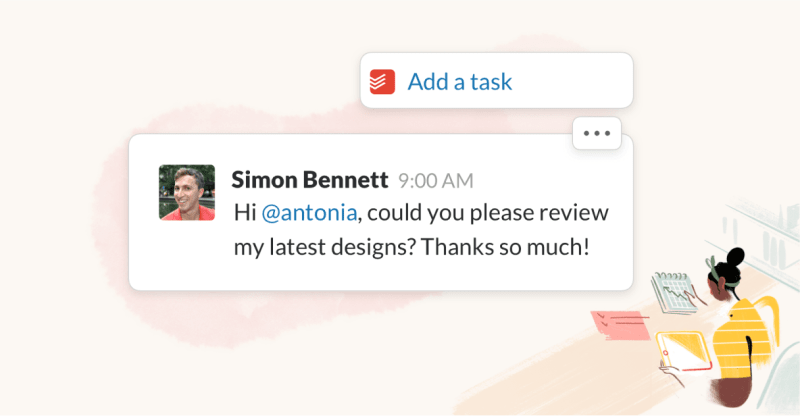
The integration makes it effortless to create, assign, and complete tasks right from Slack.
Get @mentions in Todoist
Instead of heading into each app — like GitHub, Figma, and Dropbox — it’s easier for me to receive all my mentions and notifications in Todoist. I do this with Zapier integrations, plus a Communication filter — to steal an idea from Carl. I can respond when I’m ready, but this way I never forget to follow up.
Add work details to tasks
Anton, a frontend developer at Todoist, uses Zapier integrations all the time. His current favorite is a Zap that turns new work charges on his corporate card from Google Sheet lines into Todoist tasks — complete with all the details that he needs to add into the Todoist expense report system.
Transform tasks into calendar events
Panos, a product designer at Todoist, runs his entire life in the app. He uses the project calendar feed to automatically move tasks from his Payments project to his shared family calendar, so bills are never forgotten.
Add tasks on the go with shortcuts
Another of Panos’ tricks? He uses iOS Shortcuts to turn websites into tasks in his Bookmarks project, scheduled for today. At the end of the day, he clicks through every last link he found interesting from Twitter and Reddit — but after getting the rest of his work done.

By enabling the Show in Share Sheet option from the three dots icon, Panos is able to select the shortcut from his share options anywhere on iOS!
Remember to read bookmarks
Todoist CEO Amir does something similar, using the Todoist integration with Google Chrome. He actually recently updated the integration for a better workflow (yes, even Amir is still tweaking his workflow). He can now right-click on any website, select Add to Todoist, and choose his Learning project plus a due date. He’s found that without scheduling due dates to read those articles alongside his other tasks, he quickly has too many on his list.
App callout note: Tip: Get more integrations tips and example...
If you have a hard time maintaining your energy levels …
learn to harness your biological rhythms to get more productive.
Willian, an author and software developer at Todoist, had a eureka moment upon reading Daniel Pink’s book, When: The Scientific Secrets of Perfect Timing. He learned that science had a lot to tell him about his own body and how to optimize his schedule for getting more done — and having more balance.
Instead of scheduling his time, he started scheduling his energy. To begin, he used the Daily When Tracker to figure out the points in the day when he generally feels his highest and lowest energy levels.
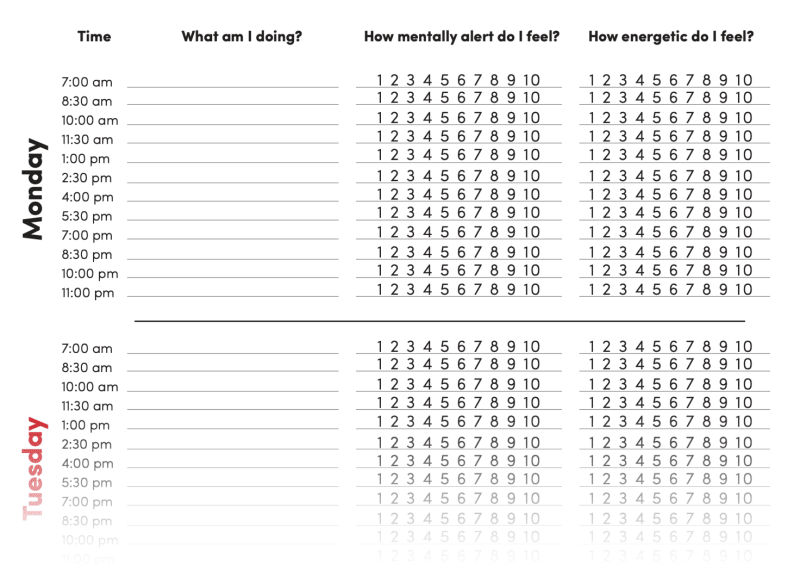
The Daily When Tracker lets you get a more granular sense of your energy by tracking your behavior systematically for a week.
Label every task based upon energy
Willian uses the book’s method to break each day into three types of energy from highest to lowest: peak, rebound, and trough. With that in mind, he uses labels for all of his Todoist tasks, so he can later decide quickly what to work on next:
Peak: analytical tasks that require focus and vigilance
Rebound: work that requires both focus and creativity
Trough: low-energy work that doesn’t require strict attention but still needs to be done
Create custom filters for each energy level
When it comes to actually get work done, Willian chooses tasks that match the level of energy he has.
Peak: When his energy is its highest he tackles everything that has his @peak label, is a priority one task, or is on his calendar in the next four hours.
➡️ His actual filter: (@peak | p1 | (@Gcal & due before: +4 hours & !overdue)) & today & (assigned to: me | !assigned)
Trough: Right after lunch, at his lowest energy, he handles emails, team discussions, and simple code reviews.
➡️ His actual filter: (@trough | (!@peak & !@recovery)) & today & (assigned to: me | !assigned)
Rebound: When he’s refreshed in the afternoon, right before ending work, he takes on all items he’s labeled @rebound, plus leftovers from his @peak label, and top two priority levels.
➡️ His actual filter: (@rebound | @peak | p1 | p2) & today & (assigned to: me | !assigned)

There are nearly endless filter options, from keywords to due dates to assignees.
Schedule breaks with reminders
Of course, the other big part of this influential book shows that taking breaks is as important as working for the right energy level. Willian makes sure to schedule plenty, prioritizing them just as he would any other integral part of his job.
One of his favorites? Setting a recurring task: Walk outside with the dog every workday at 2pm @trough.
Learn all about how Willian’s shifted his whole day around the science of his energy.
If you’re always on the go …
use your voice, widgets, and location-based reminders.
Neil, a product marketer at Todoist and dad, keeps both work and life in order by capturing tasks as he goes. He swears by voice assistants, plus a few other Todoist tricks — like mobile widgets, and location-based reminders — to add tasks as quickly as he thinks of them. Of course, since he adds everything to Todoist, he also needs to rely on robust sorting options to surface what he needs to work on next.
Keep Todoist with you everywhere
Whether on desktop, mobile, or wandering about the house, Neil keeps Todoist close. He Quick Adds tasks from his desktop in his office, completes family to-dos from his iPhone while walking with his son, and verbalizes tasks he can’t forget with voice command while cooking breakfast.
App callout note: Tip: Here are 11 fast ways to...
Capture tasks, handsfree
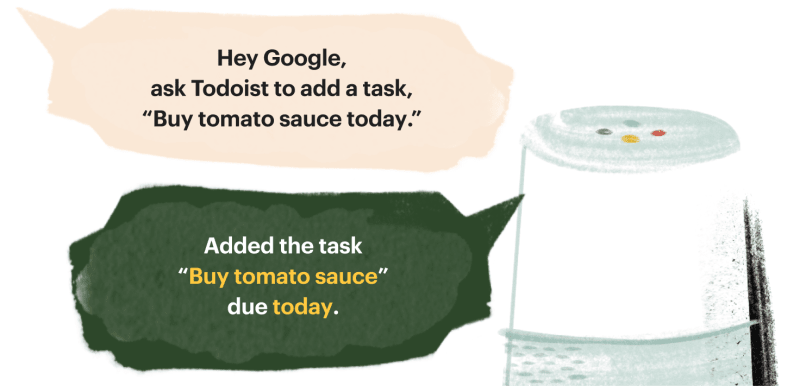
Neil finds it super easy to capture every task by dictating his to-dos aloud so they magically appear on his list when he next opens it up.
Todoist integrations with Alexi, Siri, and Google Assistant are all built for easily adding tasks to your list — and checking them off!
Use widgets to add often-used tasks
If talking to your voice assistant isn’t possible or desirable, Todoist widgets for iOS and Android lend themselves to task-adding with even less effort. The Add Task widget lets you hit one button to add the same task you do over and over again — like including milk and eggs on your Grocery project due tomorrow.
Widgets also mean you can check your to-do list right from your mobile screen, without ever opening the app. And you can even keep your achievements front and center with a widget that shows your current progress toward daily and weekly goals as well as your Karma stats.

The productivity widget gives you an overview of your current productivity stats and your current Karma score.
App callout note: Tip: You can make Todoist part of...
Forward tasks via email
If you’re using Todoist’s Free plan, you now have access to a tool that Pro plan users have relied on for years: email forwarding. Moving emails to tasks means that you’re able to get to things on your time, while not having dozens of unreads in your inbox or forgetting to circle back.
Remember the shopping
Todoist also features location-based reminders, which will ping your mobile device when you’re close to a pre-determined place. It’s perfect for remembering to pick up the coffee you’re running low on the next time you’re close to the supermarket.
App callout note: Tip: Willian goes a step further and...
Sort your tasks in two clicks
One last tip from Neil? Since he adds nearly everything to Todoist, opening up his Inbox or Today view started to feel overwhelming — with hundreds of tasks in his Inbox and 30+ tasks due each day. Neil solves the problem of a long scroll by setting up custom sorting in any view with lots of tasks.
For his Inbox, he’s able to sort by due date — so he can make a plan for tasks that are coming up next. And instead of seeing all tasks in his Today view in an endless scroll, he groups them by project.
If he’s ready to tackle his next marketing campaign, he simply heads to his PMM Planning project. From there he can add custom sorting, like by priority, assignee, or even date added (perfect for checking super-old items off his list).

Neil can sort his tasks by the date they were added, to check very old items off his list.
If you need some inspiration ...
explore templates to kickstart plans with ready-made projects.
Todoist templates are a great way to try new workflows with minimal effort. We've created many to start you off:
Track every step of your next ambitious goal with this project tracker
Avoid burnout with this template to disconnect from tech
Review your tasks every week with this Getting Things Done workflow
Or use a template created and shared by your fellow Todoisters:
You can even create custom templates yourself complete with the tasks, due dates, links, and priorities that are important to your work and life. Either simply duplicate a project that you'd like to use another time or export projects as templates you can use over and over again or even share as a link.
Make your do-it-yourself templates even more helpful with relative due dates like tomorrow or in 5 days, which will be set based on the date you import the template. For example, if you create your new project and import the template on May 5, any task with a due date of tomorrow will be due on May 6.
Have a project template you love? Share it with us!
With so many ways to upgrade your productivity workflows, it’s easy to declutter your mind and keep all your projects on track. Of course, finding the ways to work that help you feel calm and organized can take time.
One concrete next step to take on your journey toward greater productivity is using the productivity method quiz. From there, you can select one of these workflows to match your methodology. Try out the process that feels right to you, keep track of your results, and tweak as you go.
When you find the features and processes that click, let us know!
Wish your teamwork could be just as clear and productive? See how Twist might help — the communication tool also built from our team at Todoist.

Aer Parris
Aer Parris is a product marketer at Todoist.