
How Wallpaper Designer Sian Zeng Uses Todoist to Stay Inspired & Collaborate From Home
From getting motivated creatively to managing a small business (plus exclusive wallpapers for your desktop and phone!)

After she graduated with a bachelor of arts in textile design from Central Saint Martins-University of the Arts London, wallpaper creator Sian Zeng planned to look for jobs at design firms before starting her own business.
“I thought that I would need a couple of years of working with somebody to understand the business world,” she says.
But it was 2009 in the depths of the financial crisis, and full-time design roles were scarce. She started to consider her options: “I thought, I could either go and study a master’s, or I can create my own job by starting a company myself. And so I started a company. It was a natural merge of my passions and skills, and my final year project at university, my magnetic wallpaper, had already gained attention with numerous press features, giving me the confidence to take the leap,” says Sian, who also holds an economics degree from University College London.
The Etsy shop she started 11 years ago is now Sian Zeng, an online store that sells wallpapers beloved by customers for their intricate storybook themes, like Dinosaurs, Seasons, and Jungle, and their unique interactive, magnetic designs. Kids and adults alike can move pieces around and create their own story by, say, zooming a helicopter into the jaws of a dinosaur or flying a pig over city apartments.

Designer Sian Zeng creates inspired wallpaper designs like dinosaurs, seasons, and the jungle.
Her designs have won her the Grand Prize at the Etsy Design Awards; fans including Hilary Duff (who ordered the wallpaper for her child’s nursery); and features in the BBC, the Guardian, Dwell, and more. As with many design companies, Sian Zeng Wallpapers is an intimate operation with Sian deeply involved not only with the design but also marketing, photo shoots, orders, and customer service. To manage these varied elements of her business, she tried different task management apps over the years, but none stuck.
Then in 2013, she found Todoist. She liked it so much that she introduced it as the team task management system at her design company in London. Over the past 7 years, the app’s simplicity and adaptability have allowed Sian to switch easily between the varied creative, marketing, and logistic tasks that go into running and growing her business, organizing her day in a way that lets her effectively manage and create.
When her team moved out of their London studio to work from home at the beginning of the pandemic, the company leveled up how they use Todoist so they could continue to create new collections and dispatch orders.

Photo credit: Veerle Evens for Etsy
“The main things I like about Todoist is how simple it is to add tasks, and at the same time, there is so much functionality if you need it,” says Sian. Learn all about how Sian and her team use Todoist to balance creativity and productivity as they continue to grow a successful wallpaper design business.
Using Todoist as a creative
Although Sian hadn’t planned to design wallpaper, it became an ideal medium for her to explore her vision of art: to “create landscapes that you can relax into in a dreamy state, as something that removes you from reality.”
Her first design was inspired by a dissertation she wrote on the story of “Little Red Riding Hood.” Over the centuries, the story had changed as it was passed down and retold by different generations.
“My idea was to create an interactive wall where the background is the same, but people can move the characters around and leave little messages on the speech bubbles, so they can create their own version of the same story,” she says.

Sian in her studio, painting and working on her computer (Photo credit: Veerle Evens for Etsy)
Like many creative people, one of Sian’s biggest hurdles in designing a new wallpaper collection is getting started.
“I say, ‘I’ll start tomorrow,’ and then in the meantime, I fiddle with emails and with loads of things. And I’m not moving ahead, because it seems like a massive thing to tackle,” she says.
Now, she uses Todoist to create a repeatable set of tasks for designing a collection, which breaks things down into manageable steps and gets her going. When she begins a new collection, she duplicates the task along with all it's sub-tasks from the previous collection, which saves the time of creating a whole new set of tasks manually.
“I find the structure helpful. It doesn't mean that you have to follow that structure, but I find that starting is the most difficult part,” she says. “And once I get started, my brain goes really fast, I'll get ahold of that pen, I will get more paint out. And then I get into these hyperactive states where I can create loads in a very short amount of time,” she says.

Sian's work space, and Sian watering plants, in her London apartment (Photo credit: Veerle Evens for Made.com)
Using Todoist to break down her collections also gives her momentum to keep going on projects that can take months if not a year to design, like her fish wallpaper that will launch soon. Sian tried many different fish styles—creating at least 40 pages of different paintings—before she narrowed it down to the ultimate design.
“I painted loads, but at times it can feel like you haven't launched anything new,” she says.
Her collection creation project includes tasks to help her conceive the idea, (“create a mood board”), tasks related to drawing and painting (“test paint 1 fish,” “scan and edit artwork”), and tasks for the printing of the design. Ticking these smaller tasks off gives her the satisfying feeling of progressing even if she still has a long way to go until the end.

Sian's Todoist project for her fish wallpaper collection: she duplicates her tasks along with all their sub-tasks from previous collection to save the time of creating a whole new set of tasks manually.

Being able to tick off tasks gives Sian the satisfying feeling of progressing when she's working on a collection.
Using Todoist as a business owner and manager
Todoist is ideal for Sian Zeng’s small team, which consists of herself, an assistant, a part-time marketing manager, and two freelancers who help her with graphic and wallpaper design.
“With a small company, you really can't waste time. We have so many projects going on. Being able to delegate more and easily assign tasks to team members really helps move things along quicker,” she says.
Using shared projects as a team
Sian has a shared Todoist project with each of her two employees, who manage various aspects of the business. She uses it with her assistant to fulfill orders and respond to customer inquiries. Meanwhile, she and her marketing manager rely on it to help run the company’s website, newsletter, and social media. Sian finds it easiest to have a shared project for each employee. Using the new board view for both projects gives Sian an easy overview of what each person is working on.

A shared project in board view between Sian and her marketing manager, Emily
Sian’s team uses sections to break the project up into different types of tasks, like "New Collection Launch" and "Repeat Tasks." Sian and her team give tasks they do regularly, such as posting on Instagram, recurring due dates, so they don’t have to add the task manually every time they need to complete it.
Since transitioning to working from home, Sian has found the priorities feature helpful for indicating to her team the order in which they can complete tasks, flagging it as Priority 1, for example.
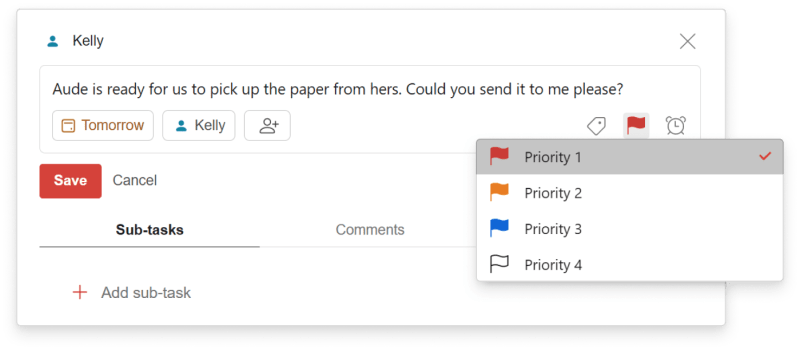
Using priority levels helps Sian convey to her reports which task they can work on first.
They also use comments to clarify information about tasks that are assigned. “I can leave comments on tasks for my team so that I can explain them better, and they get notified when I make a comment or when they leave me a comment,” says Sian.
The team also shares a project called "Important Things to Remember" that includes information they frequently need to reference, such as the company’s VAT number. This shared system speeds up remote collaboration, by making it easy for everyone to find the information they need without having to ask around for it.
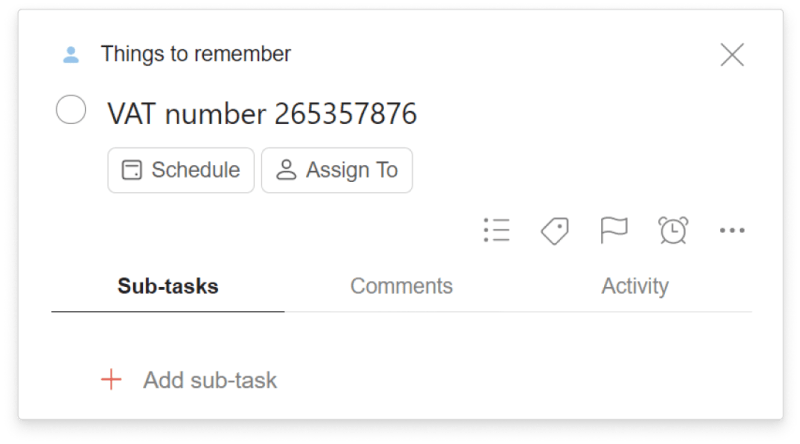
A project of “Things to Remember” gives Sian Zeng a shared space for documentation like their VAT.
App callout note: 💡 Tip: If you and your team...
Using Boards for photo shoots
Sian recently switched from using Trello to Todoist’s Boards to manage photo shoots of a new wallpaper collection. She and her stylist create a shared project to keep track of the 20 or 30 props they typically need plus clothing for the models.
“When you have 40 or 50 lists of things to do, it gives it a better structure when there are boards,” she says.
To run the shoot more efficiently, the board includes a column for each scene of a shoot. Sian and her stylist can then move the props between columns to keep straight where props are over the course of the shoot.
“We can see shot number one has the bed, the cushions, the bed spread, and then very easily you can visualize what we're missing,” she says. “We may be like ‘Oh no, we haven't gotten the carpet yet,’ or something like that.”
They also have a "Post Mortem" section, where they write down lessons learned that they can carry over to the next shoot.

Sian Zeng uses Boards to keep track of what her team needs for various scenes in a photo shoot
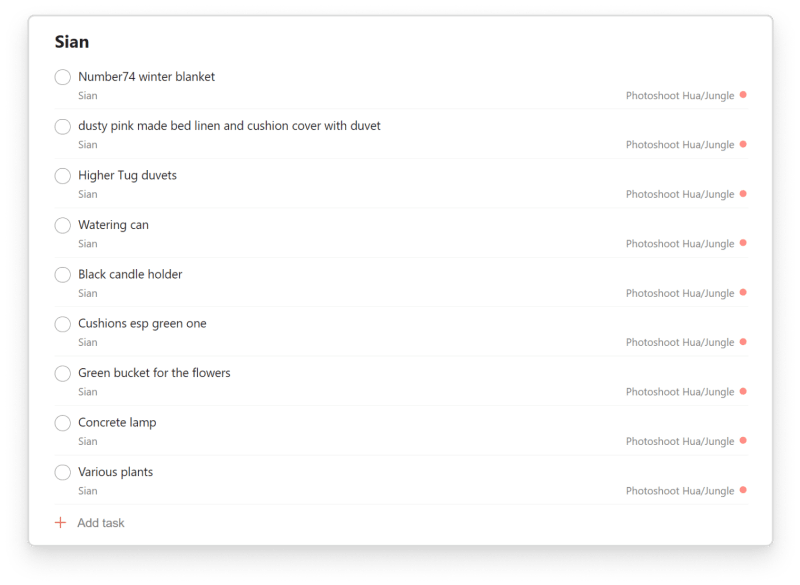
Sian keeps track of props she'll need for photo shoots with Todoist.
Using Todoist to stick to a Maker-Manager schedule
As a creative who runs the operations of a business, Sian has to operate on both a manager’s and a maker’s schedule. She has to oversee others while also giving herself uninterrupted time to create. She balances these two very different roles with time blocking, working on most of the manager tasks in the morning and the maker tasks in the afternoon.
The morning tasks tend to be smaller but more urgent. “I get them done before I start on a larger project, so that I'm not disturbed while I'm working on something that requires a lot of attention,” she says. “After lunch, I can focus on something that is bigger, that it takes like three, four or five hours to complete. And that way I have a chunk of time, that's more like deep work.”
She uses Todoist to help her maintain this schedule by tagging her tasks with labels for how long they take, like @5min, @30min, or “Deep_Work.” She pulls up the less time intensive tasks in the morning and saves the deep work tasks for the afternoon. Batching her tasks this way helps her get into a “flow state” when she is creating a new collection.
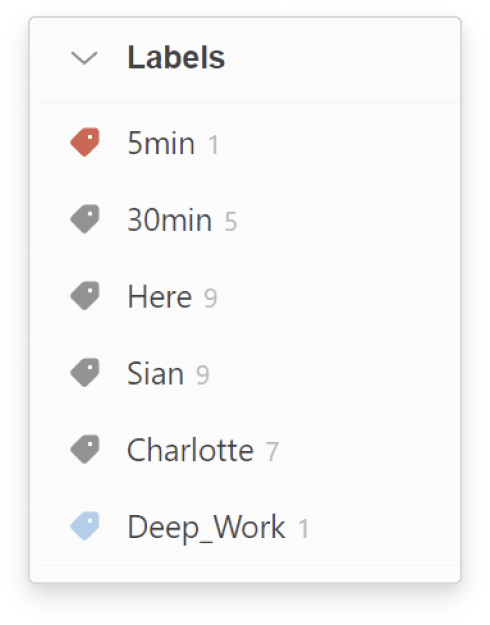
Sian tags her tasks with labels for how long they take, like @5min, @30min, or “Deep_Work.” She pulls up the less time intensive tasks in the morning and saves the deep work tasks for the afternoon.
If an email comes through in the afternoon, she uses Todoist’s integration with Gmail to add an email as a task so that she can work on it during her next morning period rather than let it take her away from the work she wants to get done at that moment.
She gets a rush of satisfaction at the end of a day when all tasks are complete and she sees the “Todoist zero” illustration. “I see a pretty illustration saying enjoy your afternoon or evening. That concludes my day really nicely making me feel I can relax now,” she says.

Sian gets a rush of satisfaction at the end of the day when all tasks are complete and she sees the “Todoist zero” illustration.
Sian Zeng’s tips for using Todoist
Todoist makes it easy for Sian to get tasks out of her head and into a system, so she’s sure to follow up on them. Here are some of Sian Zeng’s top tips for using Todoist:
Email integration: With Todoist’s email integration, Sian can add her emails as tasks to Todoist so she can work on them later, batched with other, similar tasks.
Boards: With Boards, Sian and her team can visualize photo shoots, keeping track of all of the props that are needed and for what scene.
Comments: Sian and her team use comments to iron out any confusion about tasks they assign each other.
Shared projects: Sian and her team use shared projects to assign each other tasks, including a project with common information they have to reference.
Sections: Because Sian has only one active project going with each team member, dividing the project into Sections helps make things easier to keep track of.
Priorities: Sian’s team can easily figure out what task they can do first by looking at the priorities she sets them.
Labels: Sian tags tasks based on how long they will take, which helps her batch when she does them. She uses labels like @5min for tasks she can squeeze in before meetings, and @30min, and “@Deep_Work”, for tasks that are more involved.
Filters: To help her focus on what she needs to do, Sian uses a filter that lets her bring up a project called “Me” and the time query “7 days” to keep the focus on just the tasks she needs to focus on in her Me project in the next week.

To help her focus on what she needs to do, Sian uses a filter that lets her bring up a project called “Me” and the time query “7 days.”
If you love Sian’s designs and want your Todoist background to look even more awesome, download one of these lovely wallpapers Sian created for Todoist users’ desktop or smartphone. There’s Fish Snorkeler, Winter Snowdrift, and Dinosaurs (in light or dark).

Choose from one of the wallpapers Sian created for Todoist users on smartphone: Dinosaurs (light or dark), Winter Snowdrift, or Fish Snorkeler.

Choose from the Fish Snorkeler wallpaper design and several others for your desktop or smartphone.
The Fish Snorkeler wallpaper is inspired by the fish collection Sian plans to launch soon. To her, it represents a “flow state”: “I often imagine being in a state of flow is like being propelled by the current whilst snorkeling, moving forward very fast without much effort.”
We hope you enjoy these designs as much as we do!

The Todoist Team
Empower humanity with simple yet powerful productivity tools. Learn more