
How to Make Tax Season Less Terrible
Keep track of income, deductions, and deadlines with Todoist—and avoid being unpleasantly surprised at tax time

When it comes to deadlines, tax day is perhaps the most dreaded—and also the most costly to miss. In 2017, Americans owed over $131 billion in back taxes, penalties, and interest. Common tax mistakes also come with a price tag: according to accountants, not taking eligible deductions, not claiming a dependent, and failing to take advantage of filing jointly with a spouse can all drive up your tax bill.
It’s hard to blame people for procrastinating on this annual financial chore. In terms of appeal, doing your taxes is somewhere south of going to the dentist and renewing your driver’s license. It’s a confusing process that forces us to confront the complicated and sometimes unpleasant reality of our finances.
This became more real for me when I left my full-time job to live abroad and freelance. For several years, just the thought of what my taxes would look like deterred me from making these life changes. But I didn’t want to be limited by my own (justified) fear of administrative headaches.
The first year I freelanced, in order to brace myself for a bigger tax bill than previous years, I decided to list all of the forms I needed and tick off things as I completed them. It made my taxes feel less amorphous and scary, and made freelancing feel more doable.
This article is about planning how you do your taxes so you feel more in control of them, whatever your circumstances—with tips from myself and others who’ve set up processes for everything from joint filing to paying taxes as a business owner. The goal is to help you create a manageable system so you know how to track, organize, and break the process into pieces that you can chip away at over the year, particularly in the weeks and months ahead of tax time. Some of the advice provided is specific to the U.S. tax system. However, our generalized advice on reporting income and deductions and meeting filing deadlines can be broadly applied to other countries too.
Finally, our lawyers would like us to remind you that, while this guide is all about managing and organizing your taxes, we're not providing financial or legal advice. We recommend you bring specific tax questions to an accountant or tax professional.
Planning out your tax process
My own tax situation became much more complicated a little less than 3 years ago, when I left a full-time job, moved out of one state, started freelancing, and temporarily worked in France. In prior years, it had been straightforward enough to enter the income statement I received from my one employer into my tax software. But suddenly, I had to report income from several different sources in multiple states and one foreign country. And, I had to start tracking every work expense and health expenditure, because those are eligible for a deduction in the U.S. if you’re self-employed.
It’s more effort at first, but if you take some time to plan out your tax process, it will take up much less of your brainspace in the long-run. I started that year by breaking down my taxes into four main areas:
Income (e.g. income from various clients; interest income from bank; dividend or capital gains income; rental income)
Deductions (e.g. charitable donations, interest on mortgage or student loans, work expenses)
Estimatedtax payments (e.g. projected quarterly tax installments)
Deadlines & other key dates (e.g. tax filing deadline, date you expect refunds)
Then, I added sub-bullets for what I would need in each area. For example:
1099s from clients
Income statement from foreign employer
1099-INT statement for bank interest income
Charitable donations
Healthcare expenses
Business expenses (e.g. printer, business cards, website)
Federal tax paid quarterly
State tax paid quarter
Date to start doing taxes
Tax day - usually April 15 in the United States
Date refund is expected
When I set out as a freelancer, Todoist became one of my first clients, and I began using Todoist for organizing a few of my work-related projects. I decided to give it a try for managing my taxes too. Two years later, I still use Todoist for work and life, including my finances.
If you use a task manager like Todoist, you can create a project for your Taxes that includes the areas listed—from your total income to those daunting deadlines. If you’re like me and have a lot of different types of income and expenses, you can add each area as a section. It was a huge relief to have my taxes broken down into bite-sized chunks.

Create a project for your taxes using Todoist, with sections for each area
Before doing your taxes, the filing deadline hangs over your head. In the U.S., if you file late, you’re subject to a penalty unless you can get an extension. But it’s best not to leave your taxes until the last minute. I usually get started on my taxes in February, once all of my forms have come in.
Once I started using Todoist, it was easy to break up doing my taxes and set due dates for various stages of the tax process—like trying to get all income entered in by mid-February, or all deductions by early March.

Set due dates for various stages of your taxes
To remind himself to get started on his taxes, Jehan Lalkaka, a product marketing lead, creates what he calls a “trigger task:
“I usually set a date for the first task in my 2026 taxes project as a reminder for when to start the process again in 2027. When my ‘trigger task’ shows up in my ‘Today’ view in Todoist, I know it’s time to start working on my taxes."
He also creates a task with a due date for the when he wants to file his taxes.

Set a due date to your task for filing your tax return
You can continue to use this project for coming tax years. Jehan duplicates his current year’s Taxes project in Todoist for the upcoming tax year before he checks anything off. For example, when he was starting on his 2025 taxes, he duplicated the project to create one for the following year, his 2026 taxes.
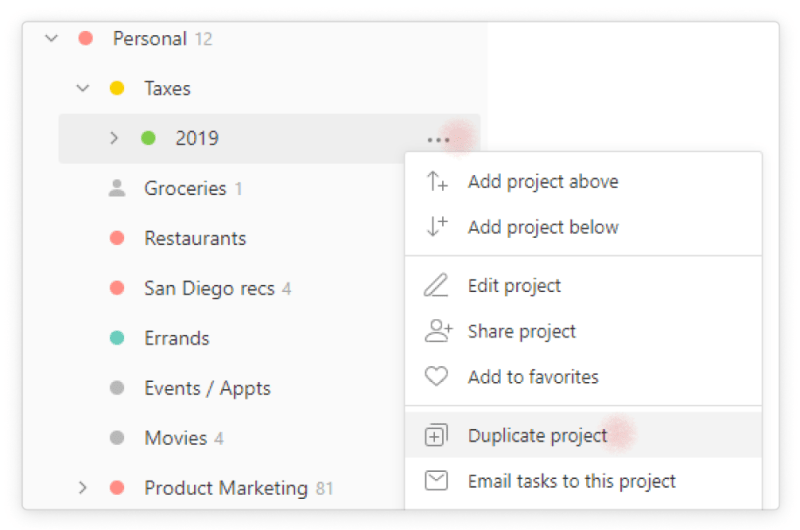
Duplicate your tax project so you can use it in future tax years
Another approach is to export your project as a template that you can then import for future years’ taxes.
To zoom out and get a bird's eye view of the tax process I use Todoist’s Boards view, which displays the sections as columns.
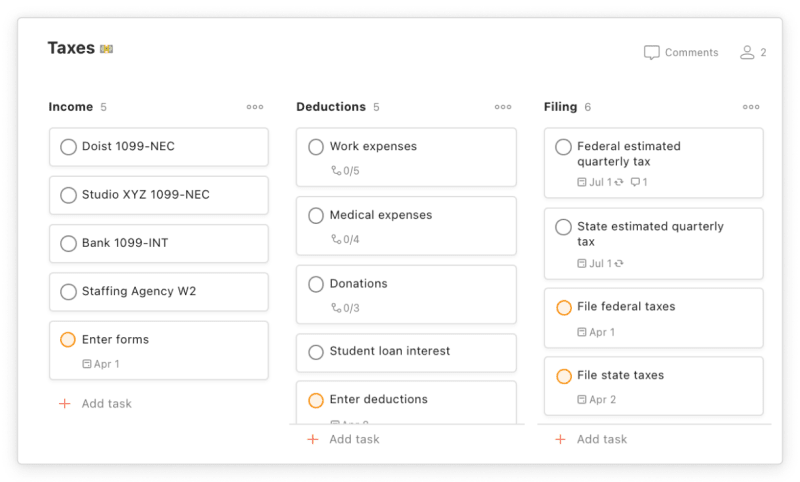
Use Todoist Boards to get a bird's eye view of your taxes.
Another way to set up Boards is to create columns that correspond to different stages in the process, like Waiting (e.g. waiting to receive a form in the mail), Received, Entered, or Filed. Then, move a task, such as an income form or type of deduction, to the proper column when you’ve received, entered, or filed it.

Use Todoist Boards to track and visualize where you are in the tax process
App callout note: 📈 Manage your taxes with our Todoist...
Reporting income
Once you create an organizing structure for your taxes, focus on identifying what you need to gather for each section. For example, in the income section of your tax project, list relevant income forms you're waiting on from employers, clients, and your bank.
If you earn income from multiple sources, keeping track of tax forms gets complicated fast. I get my first tax form sometime in late January, and the last one usually rolls in at the end of February. Some come by mail, others by email, and others, like my bank tax form, are accessible directly through their online banking website. In order to make sure I report all of my income in my tax return, I add each income statement that I need as a task in the Income section of my Tax project in Todoist.
App callout note: In the U.S., there are a variety...

Keep track of your tax income forms, and tick them off after entering them in your tax software or sending to your accountant
When you receive a form in the mail, you can snap a photo of it on your phone and add it as a task. Alternatively, you can upload it to the comments section of an already-created task. (See the “Keep all your forms in one place” section below)
Then, when I enter the form into my tax software, I tick off its task in Todoist. If I need to go back to see what I’ve already entered, I can just go to View completed tasks.
Tracking expenses and deductions
One of the biggest tax headaches is figuring out what you need to report as an expense or a deduction—which can help you save money by reducing the amount of your income that is taxed. For example, currently in the U.S., homeowners are able to deduct the interest of their mortgage, and student borrowers can deduct the interest on their loans. Parents or other individuals who paid for child or other dependent care can also claim deductions. Freelancers, contractors, and other self-employed people can deduct work-related expenses. All taxpayers can deduct charitable donations from their taxes.
To take advantage of deductions, you need to keep track of what you spend. Before I started freelancing, I knew I should track my spending—but I didn’t. Freelancing forced me to finally tackle this.
To make it manageable, I set up a system for adding my expenses into a spreadsheet. Once a week, I review my credit card and checking transactions and a task comment I keep in Todoist on cash expenses and enter each expense into my spreadsheet. I have a weekly recurring task reminding me to do this.

Create a recurring task to remind you to enter expenses (including those you plan to deduct in your taxes).
In my spreadsheet, I add categories to these expenses, like “Donations,” “Work Expenses,” and “Medical,” that I can then return to when I’m doing my taxes. (While I like entering my expenses manually, because it gives me a sense of how I spend my money—maybe more than I’d like sometimes!— there are plenty of automated personal finance software options for tracking expenses available to save you time).
If you don’t track all of your expenses, don’t worry. You can still set up a system noting expenses specific to your tax deductions, like work expenses or student loan interest.
Just go to the Deductions section of your Tax project and add a task for the category of expenses, for example, “Work expenses” or “Medical expenses.”
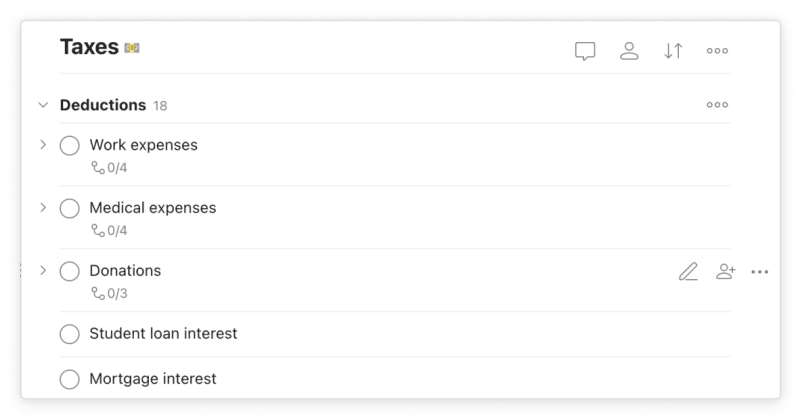
Keep track of the different kinds of expenses you will deduct on your taxes in one place.
Then, add your receipts as they come in as a sub-task under the corresponding task for the type of deduction. Your expenses will all be in one place when you’re working on your taxes.
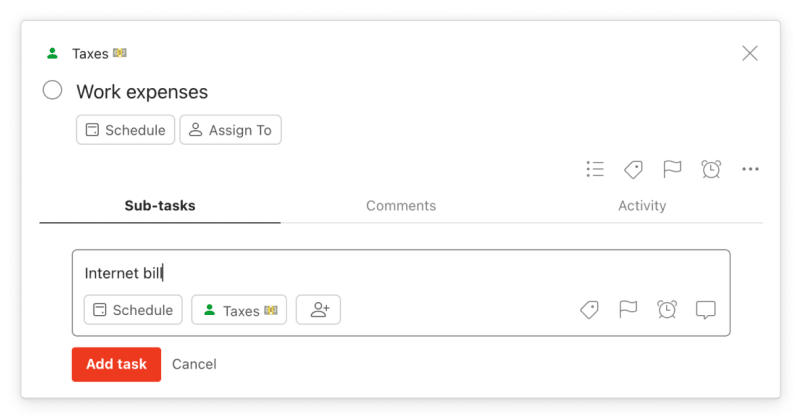
Add a new expense as a sub-task as it comes in under the corresponding deduction task
Keeping track of your forms in one place
Rather than spending hours searching through your email or folders around tax time, trying to find a 1099 statement, a donation receipt, or a work expense, add these items to Todoist as tasks when you receive them to keep your documents organized and centralized.
For example, if you receive a receipt for a work expense by email, you can add it directly from your email to Todoist as a task in one of two ways:
In the Quick Add task box, you can choose the project and section for your receipt.

Add a receipt for a work expense in email as a sub-task to a Work Expenses task of your Deductions section.
This will then appear as a linked task in your Todoist project that takes you back to the original email when you click on it.
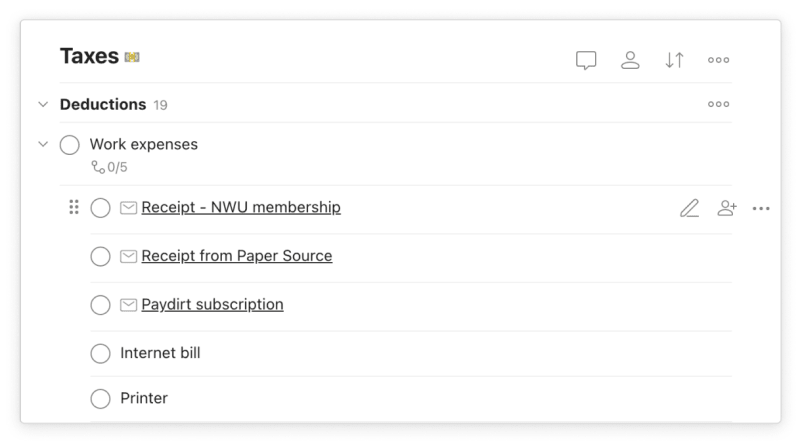
When you add an email receipt to Todoist, it shows up on your list of tasks or sub-tasks
When it’s tax time, you can head to the Work Expenses sub-task of the Deductions section of your Taxes project and tick off each receipt as you add up your expenses or share them with your accountant.
You can do the same thing to keep track of forms to report income, like W2s and 1099s, as well as other kinds of deductions like healthcare expenditures (e.g. insurance premium or prescription medication receipts).
For forms that come through snail mail, like 1099 statements, you can scan them into Todoist when you receive them, as Jehan does:
“As the tax docs start rolling in via mail, I scan them using my phone right away (I use the Office Lens app to scan documents using my smartphone) and add them ‘as a task’ to the Documents sub-project.”
He adds the scanned document as a task by tapping the share button and choosing the Todoist icon, which brings up the Quick Add feature.
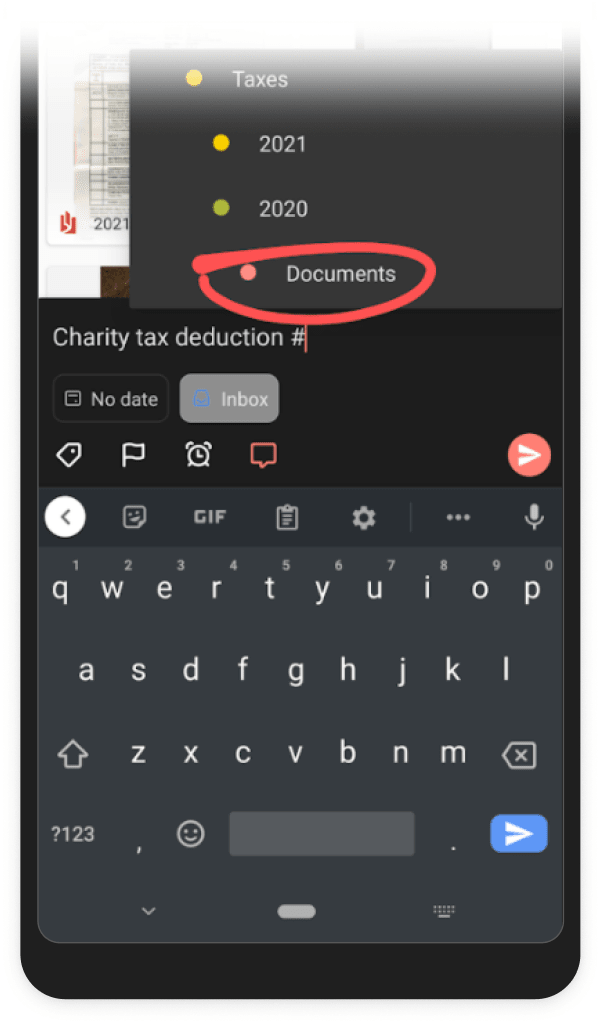
Add a scanned tax document from your phone to Todoist as a task using share and Quick Add
The scanned document gets stored as an attachment in the Task’s comments and is viewable when you go into the comments.

When you add a document as a task to Todoist, it gets stored as an attachment in the comments section of your task.
Paying estimated taxes on time
While April 15 is the looming tax deadline in the U.S., in reality we’re supposed to pay taxes over the course of the year. The April deadline is primarily for reporting all of our income to figure out whether we owe money or get a refund.
If you’re employed and your employer automatically withholds taxes from your income, you may not need to worry about estimated taxes. But if you're a freelancer or contractor, or you earn other income, such as dividends or capital gains from investments, you are responsible for making tax payments yourself. You can owe a penalty if you don’t make enough in estimated payments over the course of the year.
To avoid underpayment penalties, set up a system to remind yourself of estimated payments. I’ve created a section in my Taxes project called “Estimated Taxes” where I add tasks with recurring due dates for estimated taxes I owe to the federal and state government.

Add estimated tax payments as tasks with a recurring due date so you never forget them.
Because estimated taxes are paid quarterly, I set the task to recur every three months. Use smart Quick Add to automatically add the task to recur with that frequency by typing “quarterly” in the task (or “monthly” or “every 3 months,” etc.).
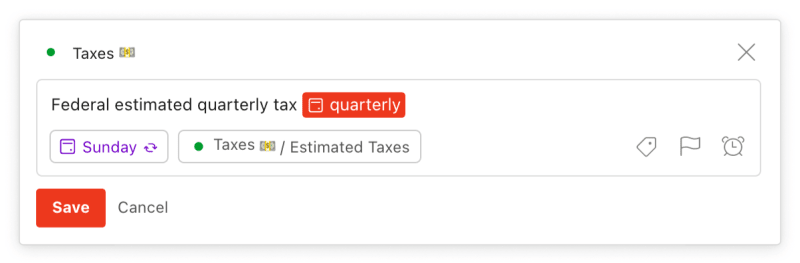
Use Todoist to set a task to recur quarterly for paying estimated taxes.
To save yourself even more time, include the link to the tax payment website (e.g. the IRS payments page) in the comments of your task, so you don’t have to search online for the site when it comes time to make the estimated payment.
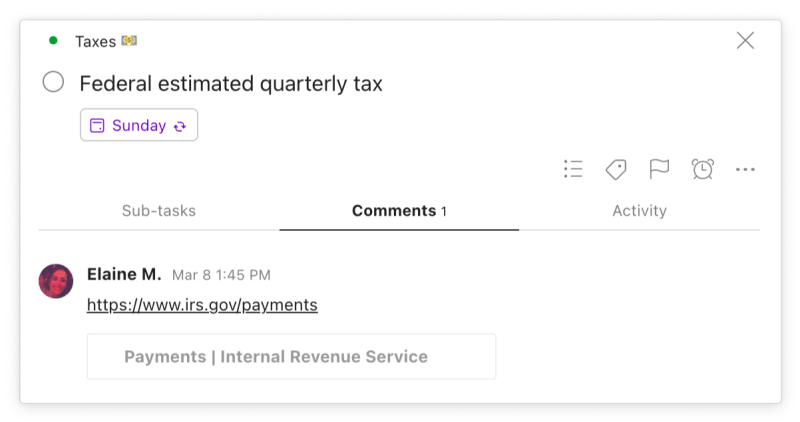
Include a link to the website where you pay your taxes in the comments of your task to save yourself time.
Filing jointly
In the United States, married couples have the option of filing taxes jointly. While it may not be the most romantic thing you do together, get on the same page with your partner ahead of tax time. If you both use Todoist, manage your taxes together using a shared project. This makes it easy to keep track of everything in a collective space: adding expenses like mortgage interest, sending tax documents to your accountant, or meeting deadlines.

Share your project with your partner to work on joint tax filing.
App callout note: Check out our semi-serious guide for tricking...
Submitting taxes as a business
As someone who operates as a sole proprietor, I only file taxes for myself. But for business owners like Shivani Shah, a content strategist based in Mumbai, India, the process is more complicated. Shivani uses Todoist to manage taxes for the content agency she runs, The City Studio. This includes keeping track of what she needs to send to her accountant, and when she needs to pay taxes so she avoids falling behind. Here’s how she uses Todoist to help:
Set a recurring due date for tax payments and reporting deadlines: Shivani sets recurring due dates to remind herself to make tax payments on certain types of expenses, like invoices paid to freelancers, consultants, and vendors (known as “Tax Deducted at Source” or TDS) on the same date each month. She also sets recurring due dates to remind herself of expenses on products sold or services provided (known as GST) that she needs to report monthly to her accountant who calculates the tax.
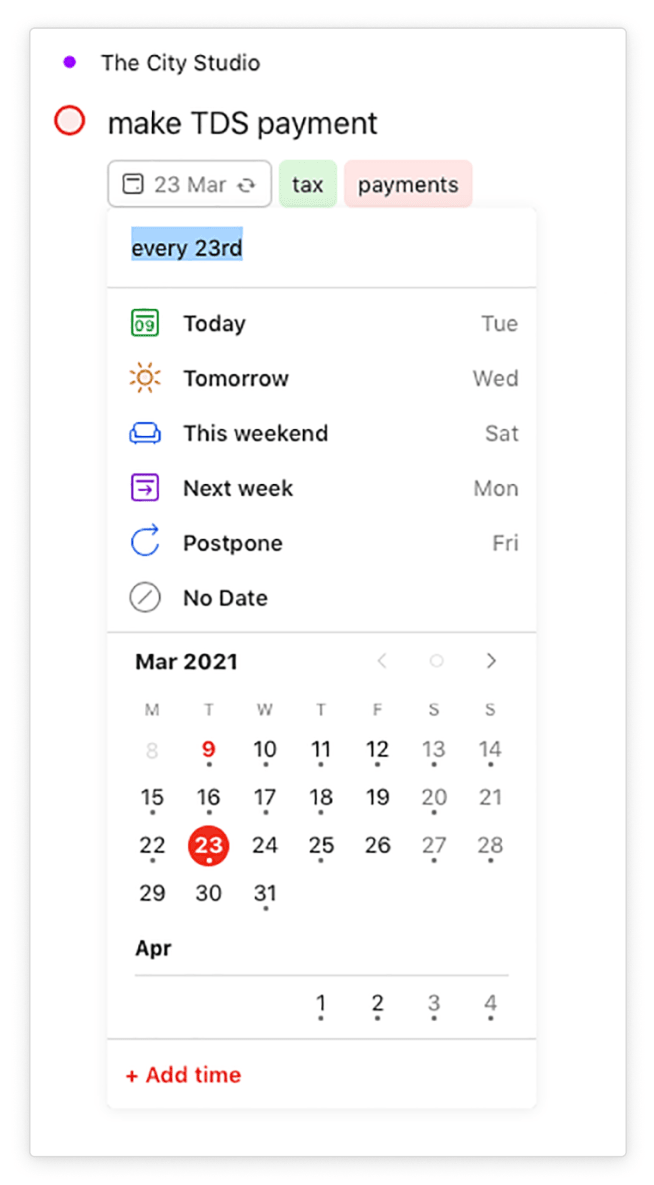
Shivani Shah sets a monthly recurring due date to remind herself to pay taxes on invoices she pays as part of her business
Add email reminders from your accountant as a task: Shivani saves herself time by adding a monthly email reminder she gets from her accountant about the GST report she needs to send as a task when it comes in “so it’s easy to find it when it’s time to reply with the reports.”
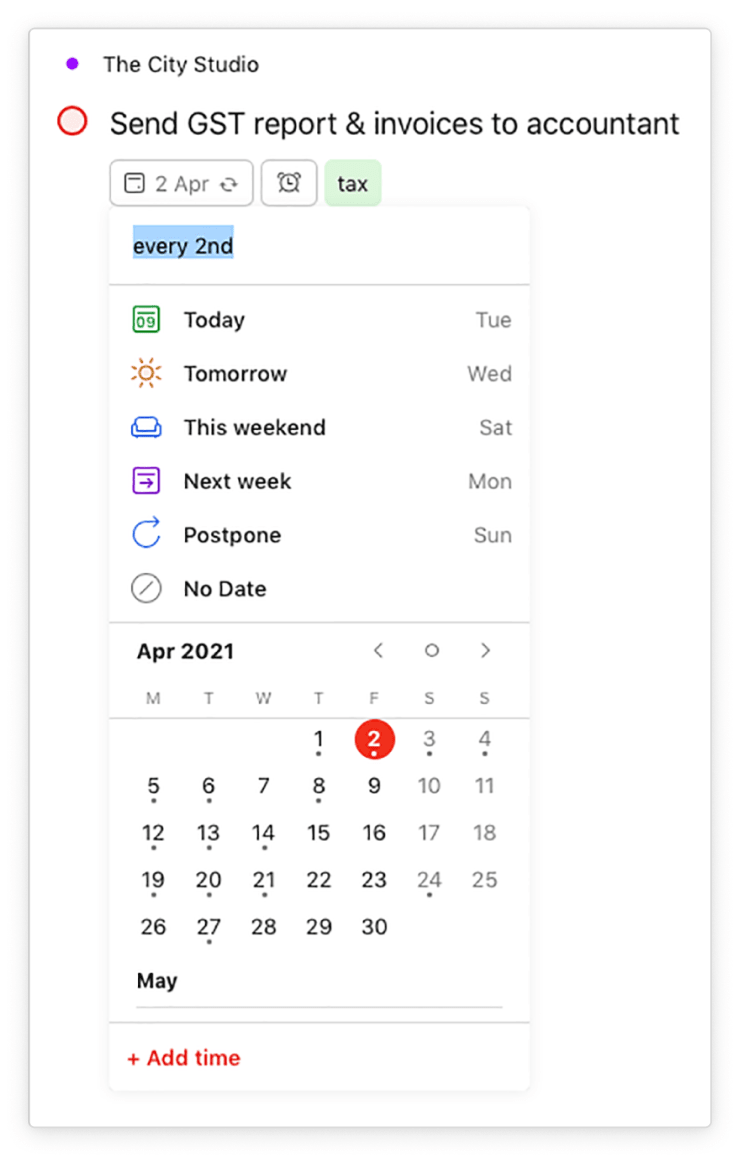
Shivani sets a email reminders from your accountant as a task to send a report of certain expenses to her accountant to get the tax calculated.
Use a filter so you’re never late with a payment: Shivani ensures she doesn’t miss a tax payment by using a filter in Todoist that queries all tasks with the labels “tax” and “payments” and the due date “today”. “That’s one of the first things I check daily, so that I can take care of all payments due quickly,” she says.
Use priority levels to your important finance tasks: Shivani uses priority levels to make sure deadline-sensitive tax tasks show up high on her list.
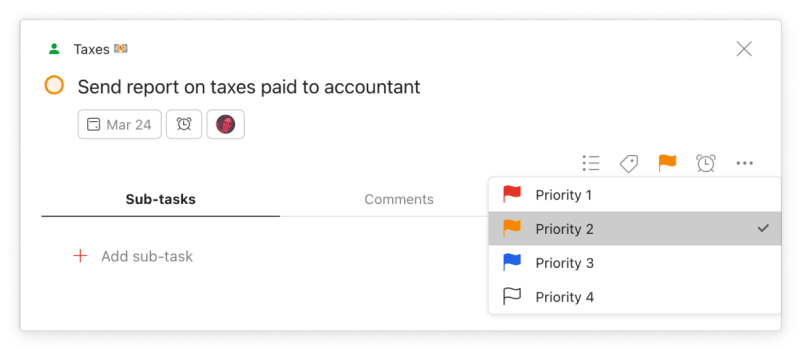
Make sure you meet your tax deadlines by giving your task a priority.
Add a reminder for tasks you need extra time to complete: Keeping track of expenses and paying and reporting taxes for a business is time consuming. Shivani adds a reminder a few days before the task is due, so she can get started in plenty of time to meet the deadline.
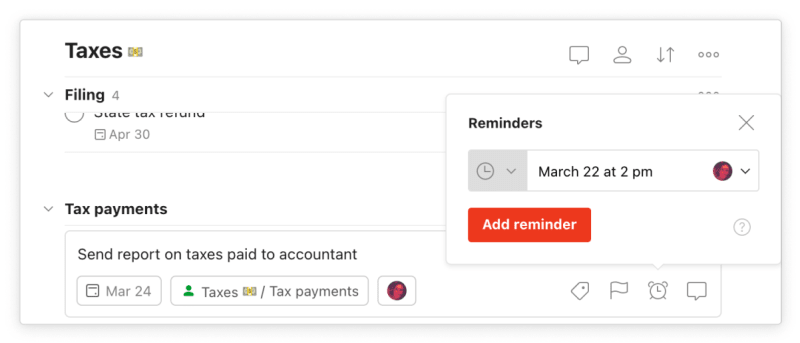
Set a reminder ahead of a due date to give yourself some lead time on a task that involves more work
Shivani’s Todoist system has helped her create an organized workflow that makes taxes easier:
“It’s a little bit of planning when you’re setting it up, but once that’s out of the way you don’t have to think about it again, ever. I’d say the hardest part before using Todoist was remembering due dates. I’d have to look them up regularly or wait for the accountants’ email, while my current system is much more proactive.”
On its own, each step of doing your taxes can feel overwhelming and stressful.Where do I file the income statement when it comes in? How should I keep track of the receipt for my new printer? When should I send everything to my accountant? Creating a system to do your taxes is about making the process sane and manageable, as well as ensuring you’re taking advantage of tax deductions and avoiding time-consuming mistakes. Ultimately, the goal is to have a system that offloads the stress of taxes from your brain, so you can focus on what you actually enjoy doing.

Elaine Meyer
Elaine is a writer, editor, and content strategist who is interested in tech, health, and the future of work.
